Accessing and analysing Canadian Surface Reanalysis (CaSR) data in the PAVICS JupyterLab
This notebook demonstrates how to access, subset, analyse and visualize Canadian Surface Reanalysis (CaSR) datasets.
- Renamed variable and converted units to match CMIP conventions;
- Added the original variable name to variable attribute "original_variable";
- Modified NetCDF data structure (chunking) to improve performance for typical climate services workflows;
- Creation of a daily dataset.
The datasets are stored on the PAVICS THREDDS server. You’ll find data at both hourly and daily frequencies. Hourly data are stored in individual files for each month and variable. Daily data are stored in files holding three years of data for each variable.
For convenience, we provide NcML aggregations, that is, single links for the hourly and daily datasets, combining multiple netCDF files (~500 files per variable for hourly data) into a single virtual dataset. The following demonstration uses those NcML aggregations.
Data access
Here we start by opening the CaSR daily dataset using OPeNDAP, a data streaming protocol. The dataset holds temperature, precipitation, humidity, and pressure variables. See the attributes of each variable for more details.
It’s critical here to specify a chunking pattern that makes sense for the analysis to follow. This is important for a couple of reasons. The first is that specifying chunks automatically triggers xarray to use dask, meaning that streaming and compute operations will be split into smaller, digestible chunks. This is need to distribute jobs across workers and threads, but it is also critical because OPeNDAP has limits on the volume of data that can be transferred in a query. Without chunking, chances are that many requests would reach that limit and raise an error.
import xarray as xr

url = "https://pavics.ouranos.ca/twitcher/ows/proxy/thredds/dodsC/datasets/reanalyses/day_NAM_GovCan_CaSR_v32_1980-2024.ncml"

# Open dataset. For hourly data, we suggest using the following chunking pattern: dict(time=1461, rlon=50, rlat=50)  : 4 year chunks in time dim
ds = xr.open_dataset(url, chunks=dict(time=1461, rlon=50, rlat=50))
ds
<xarray.Dataset> Size: 2TB
Dimensions:       (rlat: 778, rlon: 706, time: 16437)
Coordinates:
  * rlat          (rlat) float32 3kB -44.1 -44.01 -43.92 ... 25.65 25.74 25.83
  * rlon          (rlon) float32 3kB -35.4 -35.31 -35.22 ... 27.87 27.96 28.05
  * time          (time) datetime64[ns] 131kB 1980-01-01 ... 2024-12-31
    rotated_pole  int32 4B ...
    lat           (rlat, rlon) float32 2MB dask.array<chunksize=(50, 50), meta=np.ndarray>
    lon           (rlat, rlon) float32 2MB dask.array<chunksize=(50, 50), meta=np.ndarray>
Data variables: (12/49)
    orog          (rlat, rlon) float32 2MB dask.array<chunksize=(50, 50), meta=np.ndarray>
    sftgif        (rlat, rlon) float32 2MB dask.array<chunksize=(50, 50), meta=np.ndarray>
    sftlf         (rlat, rlon) float32 2MB dask.array<chunksize=(50, 50), meta=np.ndarray>
    sftlkf        (rlat, rlon) float32 2MB dask.array<chunksize=(50, 50), meta=np.ndarray>
    sftof         (rlat, rlon) float32 2MB dask.array<chunksize=(50, 50), meta=np.ndarray>
    20mWind       (time, rlat, rlon) float32 36GB dask.array<chunksize=(1461, 50, 50), meta=np.ndarray>
    ...            ...
    tamax         (time, rlat, rlon) float32 36GB dask.array<chunksize=(1461, 50, 50), meta=np.ndarray>
    tamin         (time, rlat, rlon) float32 36GB dask.array<chunksize=(1461, 50, 50), meta=np.ndarray>
    prfrmod       (time, rlat, rlon) float32 36GB dask.array<chunksize=(1461, 50, 50), meta=np.ndarray>
    prramod       (time, rlat, rlon) float32 36GB dask.array<chunksize=(1461, 50, 50), meta=np.ndarray>
    prrpmod       (time, rlat, rlon) float32 36GB dask.array<chunksize=(1461, 50, 50), meta=np.ndarray>
    prsnmod       (time, rlat, rlon) float32 36GB dask.array<chunksize=(1461, 50, 50), meta=np.ndarray>
Attributes: (12/30)
    Conventions:             CF-1.8
    Remarks:                 Original variable names are following the conven...
    contact:
    doi:                     https://doi.org/10.5194/hess-25-4917-2021
    domain:                  NAM
    frequency:               day
    ...                      ...
    history:                 2025-12-16 11:21:02.543093: Created a copy of Ca...
    description:             Original data source: https://hpfx.collab.scienc...
    institute:               Environment and Climate Change Canada
    institute_id:            ECCC
    dataset_description:     https://hpfx.collab.science.gc.ca/~scar700/rcas-...
dataset_id: CaSRv3.2- rlat: 778
- rlon: 706
- time: 16437
- rlat(rlat)float32-44.1 -44.01 -43.92 ... 25.74 25.83
- long_name :
- latitude in rotated pole grid
- axis :
- Y
- standard_name :
- projection_y_coordinate
- units :
- degrees
array([-44.100002, -44.010002, -43.920002, ..., 25.650002, 25.740002, 25.830002], shape=(778,), dtype=float32) - rlon(rlon)float32-35.4 -35.31 -35.22 ... 27.96 28.05
- long_name :
- longitude in rotated pole grid
- axis :
- X
- standard_name :
- projection_x_coordinate
- units :
- degrees
array([-35.397217, -35.30722 , -35.217224, ..., 27.872787, 27.962784, 28.05278 ], shape=(706,), dtype=float32) - time(time)datetime64[ns]1980-01-01 ... 2024-12-31
- long_name :
- time
- axis :
- T
- standard_name :
- time
array(['1980-01-01T00:00:00.000000000', '1980-01-02T00:00:00.000000000', '1980-01-03T00:00:00.000000000', ..., '2024-12-29T00:00:00.000000000', '2024-12-30T00:00:00.000000000', '2024-12-31T00:00:00.000000000'], shape=(16437,), dtype='datetime64[ns]') - rotated_pole()int32...
- north_pole_grid_longitude :
- 0.0
- grid_north_pole_latitude :
- 31.758312454493154
- grid_north_pole_longitude :
- 87.59703130293302
- earth_radius :
- 6370997.0
- grid_mapping_name :
- rotated_latitude_longitude
[1 values with dtype=int32]
- lat(rlat, rlon)float32dask.array<chunksize=(50, 50), meta=np.ndarray>
- long_name :
- latitude
- _CoordinateAxisType :
- Lat
- standard_name :
- latitude
- units :
- degrees_north
Array Chunk Bytes 2.10 MiB 9.77 kiB Shape (778, 706) (50, 50) Dask graph 240 chunks in 2 graph layers Data type float32 numpy.ndarray - lon(rlat, rlon)float32dask.array<chunksize=(50, 50), meta=np.ndarray>
- long_name :
- longitude
- _CoordinateAxisType :
- Lon
- standard_name :
- longitude
- units :
- degrees_east
Array Chunk Bytes 2.10 MiB 9.77 kiB Shape (778, 706) (50, 50) Dask graph 240 chunks in 2 graph layers Data type float32 numpy.ndarray
- orog(rlat, rlon)float32dask.array<chunksize=(50, 50), meta=np.ndarray>
- long_name :
- Surface Altitude
- grid_mapping :
- rotated_pole
- standard_name :
- surface_altitude
- units :
- m
- _QuantizeBitRoundNumberOfSignificantDigits :
- 15
- history :
- [2026-01-21 15:01:41] Data compressed with BitRound by keeping 15 bits.
- _ChunkSizes :
- [50 50]
Array Chunk Bytes 2.10 MiB 9.77 kiB Shape (778, 706) (50, 50) Dask graph 240 chunks in 2 graph layers Data type float32 numpy.ndarray - sftgif(rlat, rlon)float32dask.array<chunksize=(50, 50), meta=np.ndarray>
- long_name :
- Land Ice Area Fraction
- description :
- Fraction of grid cell covered by land ice (ice sheet, ice shelf, ice cap, glacier)
- grid_mapping :
- rotated_pole
- standard_name :
- land_ice_area_fraction
- units :
- 1
- _QuantizeBitRoundNumberOfSignificantDigits :
- 15
- history :
- [2026-01-21 15:03:58] Data compressed with BitRound by keeping 15 bits.
- _ChunkSizes :
- [50 50]
Array Chunk Bytes 2.10 MiB 9.77 kiB Shape (778, 706) (50, 50) Dask graph 240 chunks in 2 graph layers Data type float32 numpy.ndarray - sftlf(rlat, rlon)float32dask.array<chunksize=(50, 50), meta=np.ndarray>
- long_name :
- Land Area Fraction including Lakes
- description :
- Fraction of the Grid Cell Occupied by Land (Including Lakes)
- standard_name :
- land_area_fraction
- units :
- 1
- _QuantizeBitRoundNumberOfSignificantDigits :
- 15
- history :
- [2026-01-21 15:04:03] Data compressed with BitRound by keeping 15 bits.
- _ChunkSizes :
- [50 50]
Array Chunk Bytes 2.10 MiB 9.77 kiB Shape (778, 706) (50, 50) Dask graph 240 chunks in 2 graph layers Data type float32 numpy.ndarray - sftlkf(rlat, rlon)float32dask.array<chunksize=(50, 50), meta=np.ndarray>
- long_name :
- Lake Area Fraction
- area_type :
- lake_and_inland_sea
- description :
- Fraction of horizontal land grid cell area occupied by lake.
- grid_mapping :
- rotated_pole
- standard_name :
- area_fraction
- units :
- 1
- _QuantizeBitRoundNumberOfSignificantDigits :
- 15
- history :
- [2026-01-21 15:04:06] Data compressed with BitRound by keeping 15 bits.
- _ChunkSizes :
- [50 50]
Array Chunk Bytes 2.10 MiB 9.77 kiB Shape (778, 706) (50, 50) Dask graph 240 chunks in 2 graph layers Data type float32 numpy.ndarray - sftof(rlat, rlon)float32dask.array<chunksize=(50, 50), meta=np.ndarray>
- long_name :
- Sea Area Fraction
- description :
- Fraction of horizontal area occupied by ocean
- grid_mapping :
- rotated_pole
- standard_name :
- sea_area_fraction
- units :
- 1
- _QuantizeBitRoundNumberOfSignificantDigits :
- 15
- history :
- [2026-01-21 15:04:09] Data compressed with BitRound by keeping 15 bits.
- _ChunkSizes :
- [50 50]
Array Chunk Bytes 2.10 MiB 9.77 kiB Shape (778, 706) (50, 50) Dask graph 240 chunks in 2 graph layers Data type float32 numpy.ndarray - 20mWind(time, rlat, rlon)float32dask.array<chunksize=(1461, 50, 50), meta=np.ndarray>
- long_name :
- Wind Speed (20m). Height is approximate, see description.
- cell_methods :
- time: mean (interval: 1 day)
- description :
- The approximate 20 metre level is more specifically 99.75% of the atmosphere based on pressure elevation, where 100% is the surface. The true height needs to be inferred using the corresponding fields on the Charney-Phillips vertical grid (zcrd09975 - zcrd1000) (https://doi.org/10.1175/MWR-D-13-00255.1)
- grid_mapping :
- rotated_pole
- original_variable :
- P_UVC_09975
- standard_name :
- wind_speed
- units :
- m s-1
- _QuantizeBitRoundNumberOfSignificantDigits :
- 15
- history :
- [2026-01-08 09:58:34] Data compressed with BitRound by keeping 15 bits.
- _ChunkSizes :
- [1461 50 50]
Array Chunk Bytes 33.63 GiB 13.93 MiB Shape (16437, 778, 706) (1461, 50, 50) Dask graph 2880 chunks in 2 graph layers Data type float32 numpy.ndarray - 20mWinddir(time, rlat, rlon)float32dask.array<chunksize=(1461, 50, 50), meta=np.ndarray>
- long_name :
- Meteorological Wind Direction (20m)
- cell_methods :
- time: mean (interval: 1 day)
- description :
- The approximate 20 metre level is more specifically 99.75% of the atmosphere based on pressure elevation, where 100% is the surface. The true height needs to be inferred using the corresponding fields on the Charney-Phillips vertical grid (zcrd09975 - zcrd1000) (https://doi.org/10.1175/MWR-D-13-00255.1)
- grid_mapping :
- rotated_pole
- original_variable :
- P_WDC_09975
- standard_name :
- wind_from_direction
- units :
- degree
- _QuantizeBitRoundNumberOfSignificantDigits :
- 15
- history :
- [2026-01-08 10:04:05] Data compressed with BitRound by keeping 15 bits.
- _ChunkSizes :
- [1461 50 50]
Array Chunk Bytes 33.63 GiB 13.93 MiB Shape (16437, 778, 706) (1461, 50, 50) Dask graph 2880 chunks in 2 graph layers Data type float32 numpy.ndarray - cfia(time, rlat, rlon)float32dask.array<chunksize=(1461, 50, 50), meta=np.ndarray>
- long_name :
- Analysis: Confidence Index of CaPA 24h Analysis at surface
- _standard_name :
- cell_methods :
- time: point
- grid_mapping :
- rotated_pole
- original_variable :
- A_CFIA_SFC
- standard_name :
- Confidence Index of CaPA 24h Analysis
- units :
- %
- _QuantizeBitRoundNumberOfSignificantDigits :
- 15
- history :
- [2026-01-08 10:19:21] Data compressed with BitRound by keeping 15 bits.
- _ChunkSizes :
- [1461 50 50]
Array Chunk Bytes 33.63 GiB 13.93 MiB Shape (16437, 778, 706) (1461, 50, 50) Dask graph 2880 chunks in 2 graph layers Data type float32 numpy.ndarray - hur(time, rlat, rlon)float32dask.array<chunksize=(1461, 50, 50), meta=np.ndarray>
- long_name :
- 20 metre Relative Humidity (height is approximate : see description)
- cell_methods :
- time: mean (interval: 1 day)
- description :
- The approximate 20 metre level is more specifically 99.75% of the atmosphere based on pressure elevation, where 100% is the surface. The true height needs to be inferred using the corresponding fields on the Charney-Phillips vertical grid (zcrd09975 - zcrd1000) (https://doi.org/10.1175/MWR-D-13-00255.1)
- grid_mapping :
- rotated_pole
- original_variable :
- P_HR_09975
- standard_name :
- relative_humidity
- units :
- %
- _QuantizeBitRoundNumberOfSignificantDigits :
- 15
- history :
- [2026-01-08 10:26:22] Data compressed with BitRound by keeping 15 bits.
- _ChunkSizes :
- [1461 50 50]
Array Chunk Bytes 33.63 GiB 13.93 MiB Shape (16437, 778, 706) (1461, 50, 50) Dask graph 2880 chunks in 2 graph layers Data type float32 numpy.ndarray - hurmax(time, rlat, rlon)float32dask.array<chunksize=(1461, 50, 50), meta=np.ndarray>
- long_name :
- 20 metre Relative Humidity (height is approximate : see description)
- cell_methods :
- time: maximum (interval: 1 day)
- description :
- The approximate 20 metre level is more specifically 99.75% of the atmosphere based on pressure elevation, where 100% is the surface. The true height needs to be inferred using the corresponding fields on the Charney-Phillips vertical grid (zcrd09975 - zcrd1000) (https://doi.org/10.1175/MWR-D-13-00255.1)
- grid_mapping :
- rotated_pole
- original_variable :
- P_HR_09975
- standard_name :
- relative_humidity
- units :
- %
- _QuantizeBitRoundNumberOfSignificantDigits :
- 15
- history :
- [2026-01-08 10:30:26] Data compressed with BitRound by keeping 15 bits.
- _ChunkSizes :
- [1461 50 50]
Array Chunk Bytes 33.63 GiB 13.93 MiB Shape (16437, 778, 706) (1461, 50, 50) Dask graph 2880 chunks in 2 graph layers Data type float32 numpy.ndarray - hurmin(time, rlat, rlon)float32dask.array<chunksize=(1461, 50, 50), meta=np.ndarray>
- long_name :
- 20 metre Relative Humidity (height is approximate : see description)
- cell_methods :
- time: minimum (interval: 1 day)
- description :
- The approximate 20 metre level is more specifically 99.75% of the atmosphere based on pressure elevation, where 100% is the surface. The true height needs to be inferred using the corresponding fields on the Charney-Phillips vertical grid (zcrd09975 - zcrd1000) (https://doi.org/10.1175/MWR-D-13-00255.1)
- grid_mapping :
- rotated_pole
- original_variable :
- P_HR_09975
- standard_name :
- relative_humidity
- units :
- %
- _QuantizeBitRoundNumberOfSignificantDigits :
- 15
- history :
- [2026-01-08 11:00:29] Data compressed with BitRound by keeping 15 bits.
- _ChunkSizes :
- [1461 50 50]
Array Chunk Bytes 33.63 GiB 13.93 MiB Shape (16437, 778, 706) (1461, 50, 50) Dask graph 2880 chunks in 2 graph layers Data type float32 numpy.ndarray - hurs(time, rlat, rlon)float32dask.array<chunksize=(1461, 50, 50), meta=np.ndarray>
- long_name :
- Near-Surface Relative Humidity (1.5m)
- cell_methods :
- time: mean (interval: 1 day)
- grid_mapping :
- rotated_pole
- original_variable :
- P_HR_1.5m
- standard_name :
- relative_humidity
- units :
- %
- _QuantizeBitRoundNumberOfSignificantDigits :
- 15
- history :
- [2026-01-08 11:04:47] Data compressed with BitRound by keeping 15 bits.
- _ChunkSizes :
- [1461 50 50]
Array Chunk Bytes 33.63 GiB 13.93 MiB Shape (16437, 778, 706) (1461, 50, 50) Dask graph 2880 chunks in 2 graph layers Data type float32 numpy.ndarray - hursmax(time, rlat, rlon)float32dask.array<chunksize=(1461, 50, 50), meta=np.ndarray>
- long_name :
- Near-Surface Relative Humidity (1.5m)
- cell_methods :
- time: maximum (interval: 1 day)
- grid_mapping :
- rotated_pole
- original_variable :
- P_HR_1.5m
- standard_name :
- relative_humidity
- units :
- %
- _QuantizeBitRoundNumberOfSignificantDigits :
- 15
- history :
- [2026-01-08 11:08:49] Data compressed with BitRound by keeping 15 bits.
- _ChunkSizes :
- [1461 50 50]
Array Chunk Bytes 33.63 GiB 13.93 MiB Shape (16437, 778, 706) (1461, 50, 50) Dask graph 2880 chunks in 2 graph layers Data type float32 numpy.ndarray - hursmin(time, rlat, rlon)float32dask.array<chunksize=(1461, 50, 50), meta=np.ndarray>
- long_name :
- Near-Surface Relative Humidity (1.5m)
- cell_methods :
- time: minimum (interval: 1 day)
- grid_mapping :
- rotated_pole
- original_variable :
- P_HR_1.5m
- standard_name :
- relative_humidity
- units :
- %
- _QuantizeBitRoundNumberOfSignificantDigits :
- 15
- history :
- [2026-01-08 11:13:01] Data compressed with BitRound by keeping 15 bits.
- _ChunkSizes :
- [1461 50 50]
Array Chunk Bytes 33.63 GiB 13.93 MiB Shape (16437, 778, 706) (1461, 50, 50) Dask graph 2880 chunks in 2 graph layers Data type float32 numpy.ndarray - hus(time, rlat, rlon)float32dask.array<chunksize=(1461, 50, 50), meta=np.ndarray>
- long_name :
- 20 metre Specific Humidity (height is approximate : see description)
- cell_methods :
- time: mean (interval: 1 day)
- description :
- The approximate 20 metre level is more specifically 99.75% of the atmosphere based on pressure elevation, where 100% is the surface. The true height needs to be inferred using the corresponding fields on the Charney-Phillips vertical grid (zcrd09975 - zcrd1000) (https://doi.org/10.1175/MWR-D-13-00255.1)
- grid_mapping :
- rotated_pole
- original_variable :
- P_HU_09975
- standard_name :
- specific_humidity
- units :
- 1
- _QuantizeBitRoundNumberOfSignificantDigits :
- 15
- history :
- [2026-01-08 11:17:50] Data compressed with BitRound by keeping 15 bits.
- _ChunkSizes :
- [1461 50 50]
Array Chunk Bytes 33.63 GiB 13.93 MiB Shape (16437, 778, 706) (1461, 50, 50) Dask graph 2880 chunks in 2 graph layers Data type float32 numpy.ndarray - huss(time, rlat, rlon)float32dask.array<chunksize=(1461, 50, 50), meta=np.ndarray>
- long_name :
- Near-Surface Specific Humidity (1.5m)
- cell_methods :
- time: mean (interval: 1 day)
- grid_mapping :
- rotated_pole
- original_variable :
- P_HU_1.5m
- standard_name :
- specific_humidity
- units :
- 1
- _QuantizeBitRoundNumberOfSignificantDigits :
- 15
- history :
- [2026-01-08 11:22:42] Data compressed with BitRound by keeping 15 bits.
- _ChunkSizes :
- [1461 50 50]
Array Chunk Bytes 33.63 GiB 13.93 MiB Shape (16437, 778, 706) (1461, 50, 50) Dask graph 2880 chunks in 2 graph layers Data type float32 numpy.ndarray - pr(time, rlat, rlon)float32dask.array<chunksize=(1461, 50, 50), meta=np.ndarray>
- long_name :
- Precipitation
- _corrected_standard_name :
- lwe_thickness_of_precipitation_amount
- _units_context :
- hydro
- cell_methods :
- time: mean (interval: 1 day)
- comments :
- Converted from Total Precipitation using a density of 1000 kg/m³.
- description :
- This field was produced by CaPA to improve its representation of observations. This field is different from the sum of prsnmod, prramod, prfrmod and prrpmod, which come directly from the model and which are coherent with prmod.
- grid_mapping :
- rotated_pole
- original_variable :
- A_PR0_SFC
- standard_name :
- precipitation_flux
- units :
- kg m-2 s-1
- _QuantizeBitRoundNumberOfSignificantDigits :
- 15
- history :
- [2026-03-04 09:51:05] Data compressed with BitRound by keeping 15 bits.
- _ChunkSizes :
- [1461 50 50]
Array Chunk Bytes 33.63 GiB 13.93 MiB Shape (16437, 778, 706) (1461, 50, 50) Dask graph 2880 chunks in 2 graph layers Data type float32 numpy.ndarray - prmod(time, rlat, rlon)float32dask.array<chunksize=(1461, 50, 50), meta=np.ndarray>
- long_name :
- Precipitation
- _corrected_standard_name :
- lwe_thickness_of_precipitation_amount
- _units_context :
- hydro
- cell_methods :
- time: mean (interval: 1 day)
- comments :
- Converted from Total Precipitation using a density of 1000 kg/m³.
- description :
- This field differs from the 'pr' variable. It is the model background field subsequently used by CaPA to produce 'pr'.
- grid_mapping :
- rotated_pole
- original_variable :
- P_PR0_SFC
- standard_name :
- precipitation_flux
- units :
- kg m-2 s-1
- _QuantizeBitRoundNumberOfSignificantDigits :
- 15
- history :
- [2026-01-08 11:33:06] Data compressed with BitRound by keeping 15 bits.
- _ChunkSizes :
- [1461 50 50]
Array Chunk Bytes 33.63 GiB 13.93 MiB Shape (16437, 778, 706) (1461, 50, 50) Dask graph 2880 chunks in 2 graph layers Data type float32 numpy.ndarray - ps(time, rlat, rlon)float32dask.array<chunksize=(1461, 50, 50), meta=np.ndarray>
- long_name :
- Surface Air Pressure
- cell_methods :
- time: mean (interval: 1 day)
- grid_mapping :
- rotated_pole
- original_variable :
- P_P0_SFC
- standard_name :
- surface_air_pressure
- units :
- Pa
- _QuantizeBitRoundNumberOfSignificantDigits :
- 15
- history :
- [2026-01-08 11:42:45] Data compressed with BitRound by keeping 15 bits.
- _ChunkSizes :
- [1461 50 50]
Array Chunk Bytes 33.63 GiB 13.93 MiB Shape (16437, 778, 706) (1461, 50, 50) Dask graph 2880 chunks in 2 graph layers Data type float32 numpy.ndarray - psl(time, rlat, rlon)float32dask.array<chunksize=(1461, 50, 50), meta=np.ndarray>
- long_name :
- Sea Level Pressure
- cell_methods :
- time: mean (interval: 1 day)
- grid_mapping :
- rotated_pole
- original_variable :
- P_PN_SFC
- standard_name :
- air_pressure_at_sea_level
- units :
- Pa
- _QuantizeBitRoundNumberOfSignificantDigits :
- 15
- history :
- [2026-01-08 11:45:56] Data compressed with BitRound by keeping 15 bits.
- _ChunkSizes :
- [1461 50 50]
Array Chunk Bytes 33.63 GiB 13.93 MiB Shape (16437, 778, 706) (1461, 50, 50) Dask graph 2880 chunks in 2 graph layers Data type float32 numpy.ndarray - rlds(time, rlat, rlon)float32dask.array<chunksize=(1461, 50, 50), meta=np.ndarray>
- long_name :
- Surface Downwelling Longwave Radiation
- cell_methods :
- time: mean (interval: 1 day)
- grid_mapping :
- rotated_pole
- original_variable :
- P_FI_SFC
- standard_name :
- surface_downwelling_longwave_flux_in_air
- units :
- W m-2
- _QuantizeBitRoundNumberOfSignificantDigits :
- 15
- history :
- [2026-01-08 11:48:27] Data compressed with BitRound by keeping 15 bits.
- _ChunkSizes :
- [1461 50 50]
Array Chunk Bytes 33.63 GiB 13.93 MiB Shape (16437, 778, 706) (1461, 50, 50) Dask graph 2880 chunks in 2 graph layers Data type float32 numpy.ndarray - rsds(time, rlat, rlon)float32dask.array<chunksize=(1461, 50, 50), meta=np.ndarray>
- long_name :
- Surface Downwelling Shortwave Radiation
- cell_methods :
- time: mean (interval: 1 day)
- grid_mapping :
- rotated_pole
- original_variable :
- P_FB_SFC
- standard_name :
- surface_downwelling_shortwave_flux_in_air
- units :
- W m-2
- _QuantizeBitRoundNumberOfSignificantDigits :
- 15
- history :
- [2026-01-08 11:53:03] Data compressed with BitRound by keeping 15 bits.
- _ChunkSizes :
- [1461 50 50]
Array Chunk Bytes 33.63 GiB 13.93 MiB Shape (16437, 778, 706) (1461, 50, 50) Dask graph 2880 chunks in 2 graph layers Data type float32 numpy.ndarray - sfcWind(time, rlat, rlon)float32dask.array<chunksize=(1461, 50, 50), meta=np.ndarray>
- long_name :
- Near-Surface Wind Speed (10m)
- cell_methods :
- time: mean (interval: 1 day)
- grid_mapping :
- rotated_pole
- original_variable :
- P_UVC_10m
- standard_name :
- wind_speed
- units :
- m s-1
- _QuantizeBitRoundNumberOfSignificantDigits :
- 15
- history :
- [2026-01-08 11:57:51] Data compressed with BitRound by keeping 15 bits.
- _ChunkSizes :
- [1461 50 50]
Array Chunk Bytes 33.63 GiB 13.93 MiB Shape (16437, 778, 706) (1461, 50, 50) Dask graph 2880 chunks in 2 graph layers Data type float32 numpy.ndarray - sfcWindmax(time, rlat, rlon)float32dask.array<chunksize=(1461, 50, 50), meta=np.ndarray>
- long_name :
- Near-Surface Wind Speed (10m)
- cell_methods :
- time: maximum (interval: 1 day)
- grid_mapping :
- rotated_pole
- original_variable :
- P_UVC_10m
- standard_name :
- wind_speed
- units :
- m s-1
- _QuantizeBitRoundNumberOfSignificantDigits :
- 15
- history :
- [2026-01-08 12:03:08] Data compressed with BitRound by keeping 15 bits.
- _ChunkSizes :
- [1461 50 50]
Array Chunk Bytes 33.63 GiB 13.93 MiB Shape (16437, 778, 706) (1461, 50, 50) Dask graph 2880 chunks in 2 graph layers Data type float32 numpy.ndarray - tas(time, rlat, rlon)float32dask.array<chunksize=(1461, 50, 50), meta=np.ndarray>
- long_name :
- 1.5 metre temperature
- cell_methods :
- time: mean (interval: 1 day)
- grid_mapping :
- rotated_pole
- original_variable :
- P_TT_1.5m
- standard_name :
- air_temperature
- units :
- K
- units_metadata :
- temperature: unknown
- _QuantizeBitRoundNumberOfSignificantDigits :
- 15
- history :
- [2026-01-08 12:10:31] Data compressed with BitRound by keeping 15 bits.
- _ChunkSizes :
- [1461 50 50]
Array Chunk Bytes 33.63 GiB 13.93 MiB Shape (16437, 778, 706) (1461, 50, 50) Dask graph 2880 chunks in 2 graph layers Data type float32 numpy.ndarray - tasmax(time, rlat, rlon)float32dask.array<chunksize=(1461, 50, 50), meta=np.ndarray>
- long_name :
- 1.5 metre temperature
- cell_methods :
- time: maximum (interval: 1 day)
- grid_mapping :
- rotated_pole
- original_variable :
- P_TT_1.5m
- standard_name :
- air_temperature
- units :
- K
- units_metadata :
- temperature: unknown
- _QuantizeBitRoundNumberOfSignificantDigits :
- 15
- history :
- [2026-01-08 12:13:54] Data compressed with BitRound by keeping 15 bits.
- _ChunkSizes :
- [1461 50 50]
Array Chunk Bytes 33.63 GiB 13.93 MiB Shape (16437, 778, 706) (1461, 50, 50) Dask graph 2880 chunks in 2 graph layers Data type float32 numpy.ndarray - tasmin(time, rlat, rlon)float32dask.array<chunksize=(1461, 50, 50), meta=np.ndarray>
- long_name :
- 1.5 metre temperature
- cell_methods :
- time: minimum (interval: 1 day)
- grid_mapping :
- rotated_pole
- original_variable :
- P_TT_1.5m
- standard_name :
- air_temperature
- units :
- K
- units_metadata :
- temperature: unknown
- _QuantizeBitRoundNumberOfSignificantDigits :
- 15
- history :
- [2026-01-08 12:17:37] Data compressed with BitRound by keeping 15 bits.
- _ChunkSizes :
- [1461 50 50]
Array Chunk Bytes 33.63 GiB 13.93 MiB Shape (16437, 778, 706) (1461, 50, 50) Dask graph 2880 chunks in 2 graph layers Data type float32 numpy.ndarray - tdp(time, rlat, rlon)float32dask.array<chunksize=(1461, 50, 50), meta=np.ndarray>
- long_name :
- 20 metre dewpoint temperature (height is approximate : see description)
- cell_methods :
- time: mean (interval: 1 day)
- description :
- The approximate 20 metre level is more specifically 99.75% of the atmosphere based on pressure elevation, where 100% is the surface. The true height needs to be inferred using the corresponding fields on the Charney-Phillips vertical grid (zcrd09975 - zcrd1000) (https://doi.org/10.1175/MWR-D-13-00255.1)
- grid_mapping :
- rotated_pole
- original_variable :
- P_TD_09975
- standard_name :
- dew_point_temperature
- units :
- K
- units_metadata :
- temperature: unknown
- _QuantizeBitRoundNumberOfSignificantDigits :
- 15
- history :
- [2026-01-08 12:21:20] Data compressed with BitRound by keeping 15 bits.
- _ChunkSizes :
- [1461 50 50]
Array Chunk Bytes 33.63 GiB 13.93 MiB Shape (16437, 778, 706) (1461, 50, 50) Dask graph 2880 chunks in 2 graph layers Data type float32 numpy.ndarray - tdpmax(time, rlat, rlon)float32dask.array<chunksize=(1461, 50, 50), meta=np.ndarray>
- long_name :
- 20 metre dewpoint temperature (height is approximate : see description)
- cell_methods :
- time: maximum (interval: 1 day)
- description :
- The approximate 20 metre level is more specifically 99.75% of the atmosphere based on pressure elevation, where 100% is the surface. The true height needs to be inferred using the corresponding fields on the Charney-Phillips vertical grid (zcrd09975 - zcrd1000) (https://doi.org/10.1175/MWR-D-13-00255.1)
- grid_mapping :
- rotated_pole
- original_variable :
- P_TD_09975
- standard_name :
- dew_point_temperature
- units :
- K
- units_metadata :
- temperature: unknown
- _QuantizeBitRoundNumberOfSignificantDigits :
- 15
- history :
- [2026-01-08 12:25:18] Data compressed with BitRound by keeping 15 bits.
- _ChunkSizes :
- [1461 50 50]
Array Chunk Bytes 33.63 GiB 13.93 MiB Shape (16437, 778, 706) (1461, 50, 50) Dask graph 2880 chunks in 2 graph layers Data type float32 numpy.ndarray - tdpmin(time, rlat, rlon)float32dask.array<chunksize=(1461, 50, 50), meta=np.ndarray>
- long_name :
- 20 metre dewpoint temperature (height is approximate : see description)
- cell_methods :
- time: minimum (interval: 1 day)
- description :
- The approximate 20 metre level is more specifically 99.75% of the atmosphere based on pressure elevation, where 100% is the surface. The true height needs to be inferred using the corresponding fields on the Charney-Phillips vertical grid (zcrd09975 - zcrd1000) (https://doi.org/10.1175/MWR-D-13-00255.1)
- grid_mapping :
- rotated_pole
- original_variable :
- P_TD_09975
- standard_name :
- dew_point_temperature
- units :
- K
- units_metadata :
- temperature: unknown
- _QuantizeBitRoundNumberOfSignificantDigits :
- 15
- history :
- [2026-01-08 12:28:42] Data compressed with BitRound by keeping 15 bits.
- _ChunkSizes :
- [1461 50 50]
Array Chunk Bytes 33.63 GiB 13.93 MiB Shape (16437, 778, 706) (1461, 50, 50) Dask graph 2880 chunks in 2 graph layers Data type float32 numpy.ndarray - tdps(time, rlat, rlon)float32dask.array<chunksize=(1461, 50, 50), meta=np.ndarray>
- long_name :
- 1.5 metre dewpoint temperature
- cell_methods :
- time: mean (interval: 1 day)
- grid_mapping :
- rotated_pole
- original_variable :
- P_TD_1.5m
- standard_name :
- dew_point_temperature
- units :
- K
- units_metadata :
- temperature: unknown
- _QuantizeBitRoundNumberOfSignificantDigits :
- 15
- history :
- [2026-01-08 12:32:20] Data compressed with BitRound by keeping 15 bits.
- _ChunkSizes :
- [1461 50 50]
Array Chunk Bytes 33.63 GiB 13.93 MiB Shape (16437, 778, 706) (1461, 50, 50) Dask graph 2880 chunks in 2 graph layers Data type float32 numpy.ndarray - tdpsmax(time, rlat, rlon)float32dask.array<chunksize=(1461, 50, 50), meta=np.ndarray>
- long_name :
- 1.5 metre dewpoint temperature
- cell_methods :
- time: maximum (interval: 1 day)
- grid_mapping :
- rotated_pole
- original_variable :
- P_TD_1.5m
- standard_name :
- dew_point_temperature
- units :
- K
- units_metadata :
- temperature: unknown
- _QuantizeBitRoundNumberOfSignificantDigits :
- 15
- history :
- [2026-01-08 12:35:53] Data compressed with BitRound by keeping 15 bits.
- _ChunkSizes :
- [1461 50 50]
Array Chunk Bytes 33.63 GiB 13.93 MiB Shape (16437, 778, 706) (1461, 50, 50) Dask graph 2880 chunks in 2 graph layers Data type float32 numpy.ndarray - tdpsmin(time, rlat, rlon)float32dask.array<chunksize=(1461, 50, 50), meta=np.ndarray>
- long_name :
- 1.5 metre dewpoint temperature
- cell_methods :
- time: minimum (interval: 1 day)
- grid_mapping :
- rotated_pole
- original_variable :
- P_TD_1.5m
- standard_name :
- dew_point_temperature
- units :
- K
- units_metadata :
- temperature: unknown
- _QuantizeBitRoundNumberOfSignificantDigits :
- 15
- history :
- [2026-01-08 12:39:30] Data compressed with BitRound by keeping 15 bits.
- _ChunkSizes :
- [1461 50 50]
Array Chunk Bytes 33.63 GiB 13.93 MiB Shape (16437, 778, 706) (1461, 50, 50) Dask graph 2880 chunks in 2 graph layers Data type float32 numpy.ndarray - ua(time, rlat, rlon)float32dask.array<chunksize=(1461, 50, 50), meta=np.ndarray>
- long_name :
- Eastward Wind (20m). Height is approximate, see description.
- cell_methods :
- time: mean (interval: 1 day)
- description :
- The approximate 20 metre level is more specifically 99.75% of the atmosphere based on pressure elevation, where 100% is the surface. The true height needs to be inferred using the corresponding fields on the Charney-Phillips vertical grid (zcrd09975 - zcrd1000) (https://doi.org/10.1175/MWR-D-13-00255.1)
- grid_mapping :
- rotated_pole
- original_variable :
- P_UUC_09975
- standard_name :
- eastward_wind
- units :
- m s-1
- _QuantizeBitRoundNumberOfSignificantDigits :
- 15
- history :
- [2026-01-08 12:43:04] Data compressed with BitRound by keeping 15 bits.
- _ChunkSizes :
- [1461 50 50]
Array Chunk Bytes 33.63 GiB 13.93 MiB Shape (16437, 778, 706) (1461, 50, 50) Dask graph 2880 chunks in 2 graph layers Data type float32 numpy.ndarray - uas(time, rlat, rlon)float32dask.array<chunksize=(1461, 50, 50), meta=np.ndarray>
- long_name :
- Eastward Near-Surface Wind (10m)
- cell_methods :
- time: mean (interval: 1 day)
- grid_mapping :
- rotated_pole
- original_variable :
- P_UUC_10m
- standard_name :
- eastward_wind
- units :
- m s-1
- _QuantizeBitRoundNumberOfSignificantDigits :
- 15
- history :
- [2026-01-08 12:48:43] Data compressed with BitRound by keeping 15 bits.
- _ChunkSizes :
- [1461 50 50]
Array Chunk Bytes 33.63 GiB 13.93 MiB Shape (16437, 778, 706) (1461, 50, 50) Dask graph 2880 chunks in 2 graph layers Data type float32 numpy.ndarray - va(time, rlat, rlon)float32dask.array<chunksize=(1461, 50, 50), meta=np.ndarray>
- long_name :
- Northward Wind (20m). Height is approximate, see description.
- cell_methods :
- time: mean (interval: 1 day)
- description :
- The approximate 20 metre level is more specifically 99.75% of the atmosphere based on pressure elevation, where 100% is the surface. The true height needs to be inferred using the corresponding fields on the Charney-Phillips vertical grid (zcrd09975 - zcrd1000) (https://doi.org/10.1175/MWR-D-13-00255.1)
- grid_mapping :
- rotated_pole
- original_variable :
- P_VVC_09975
- standard_name :
- northward_wind
- units :
- m s-1
- _QuantizeBitRoundNumberOfSignificantDigits :
- 15
- history :
- [2026-01-08 12:54:15] Data compressed with BitRound by keeping 15 bits.
- _ChunkSizes :
- [1461 50 50]
Array Chunk Bytes 33.63 GiB 13.93 MiB Shape (16437, 778, 706) (1461, 50, 50) Dask graph 2880 chunks in 2 graph layers Data type float32 numpy.ndarray - vas(time, rlat, rlon)float32dask.array<chunksize=(1461, 50, 50), meta=np.ndarray>
- long_name :
- Northward Near-Surface Wind (10m)
- cell_methods :
- time: mean (interval: 1 day)
- grid_mapping :
- rotated_pole
- original_variable :
- P_VVC_10m
- standard_name :
- northward_wind
- units :
- m s-1
- _QuantizeBitRoundNumberOfSignificantDigits :
- 15
- history :
- [2026-01-08 12:59:43] Data compressed with BitRound by keeping 15 bits.
- _ChunkSizes :
- [1461 50 50]
Array Chunk Bytes 33.63 GiB 13.93 MiB Shape (16437, 778, 706) (1461, 50, 50) Dask graph 2880 chunks in 2 graph layers Data type float32 numpy.ndarray - winddir(time, rlat, rlon)float32dask.array<chunksize=(1461, 50, 50), meta=np.ndarray>
- long_name :
- Near-Surface Meteorological Wind Direction (10m)
- cell_methods :
- time: mean (interval: 1 day)
- grid_mapping :
- rotated_pole
- original_variable :
- P_WDC_10m
- standard_name :
- wind_from_direction
- units :
- degree
- _QuantizeBitRoundNumberOfSignificantDigits :
- 15
- history :
- [2026-01-08 13:04:40] Data compressed with BitRound by keeping 15 bits.
- _ChunkSizes :
- [1461 50 50]
Array Chunk Bytes 33.63 GiB 13.93 MiB Shape (16437, 778, 706) (1461, 50, 50) Dask graph 2880 chunks in 2 graph layers Data type float32 numpy.ndarray - zcrd09975(time, rlat, rlon)float32dask.array<chunksize=(1461, 50, 50), meta=np.ndarray>
- long_name :
- Model vertical grid coordinate
- _standard_name :
- cell_methods :
- time: mean (interval: 1 day)
- description :
- Corresponding coordinate (09975) on the GEM Charney-Phillips vertical grid (https://doi.org/10.1175/MWR-D-13-00255.1). The height of variables with level 0XXXX can be inferred zcrd0XXXX - zcrd10000.
- grid_mapping :
- rotated_pole
- original_variable :
- P_GZ_09975
- standard_name :
- Geopotential height
- units :
- m
- _QuantizeBitRoundNumberOfSignificantDigits :
- 15
- history :
- [2026-01-08 13:09:30] Data compressed with BitRound by keeping 15 bits.
- _ChunkSizes :
- [1461 50 50]
Array Chunk Bytes 33.63 GiB 13.93 MiB Shape (16437, 778, 706) (1461, 50, 50) Dask graph 2880 chunks in 2 graph layers Data type float32 numpy.ndarray - zcrd10000(time, rlat, rlon)float32dask.array<chunksize=(1461, 50, 50), meta=np.ndarray>
- long_name :
- Model vertical grid coordinate at the surface
- _standard_name :
- cell_methods :
- time: mean (interval: 1 day)
- description :
- Surface coordinate (10000) on the GEM Charney-Phillips vertical grid (https://doi.org/10.1175/MWR-D-13-00255.1). The height of variables with level 0XXXX can be inferred zcrd0XXXX - zcrd10000.
- grid_mapping :
- rotated_pole
- original_variable :
- P_GZ_SFC
- standard_name :
- Geopotential height
- units :
- m
- _QuantizeBitRoundNumberOfSignificantDigits :
- 15
- history :
- [2026-01-08 13:13:20] Data compressed with BitRound by keeping 15 bits.
- _ChunkSizes :
- [1461 50 50]
Array Chunk Bytes 33.63 GiB 13.93 MiB Shape (16437, 778, 706) (1461, 50, 50) Dask graph 2880 chunks in 2 graph layers Data type float32 numpy.ndarray - snd(time, rlat, rlon)float32dask.array<chunksize=(1461, 50, 50), meta=np.ndarray>
- long_name :
- Snow Depth
- grid_mapping :
- rotated_pole
- original_variable :
- P_SD_LAND
- standard_name :
- surface_snow_thickness
- units :
- m
- _QuantizeBitRoundNumberOfSignificantDigits :
- 15
- history :
- [2026-01-08 12:08:16] Data compressed with BitRound by keeping 15 bits.
- cell_methods :
- time: point area: mean where land
- _ChunkSizes :
- [1461 50 50]
Array Chunk Bytes 33.63 GiB 13.93 MiB Shape (16437, 778, 706) (1461, 50, 50) Dask graph 2880 chunks in 2 graph layers Data type float32 numpy.ndarray - snw(time, rlat, rlon)float32dask.array<chunksize=(1461, 50, 50), meta=np.ndarray>
- long_name :
- Surface Snow Amount
- grid_mapping :
- rotated_pole
- original_variable :
- P_SWE_LAND
- standard_name :
- surface_snow_amount
- units :
- kg m-2
- _QuantizeBitRoundNumberOfSignificantDigits :
- 15
- history :
- [2026-01-08 12:09:24] Data compressed with BitRound by keeping 15 bits.
- cell_methods :
- time: point area: mean where land
- _ChunkSizes :
- [1461 50 50]
Array Chunk Bytes 33.63 GiB 13.93 MiB Shape (16437, 778, 706) (1461, 50, 50) Dask graph 2880 chunks in 2 graph layers Data type float32 numpy.ndarray - ta(time, rlat, rlon)float32dask.array<chunksize=(1461, 50, 50), meta=np.ndarray>
- long_name :
- 20 metre Air Temperature (height is approximate : see description)
- cell_methods :
- time: mean (interval: 1 day)
- description :
- Corresponding coordinate (09975) on the GEM Charney-Phillips vertical grid (https://doi.org/10.1175/MWR-D-13-00255.1). The height of variables with level 0XXXX can be inferred zcrd0XXXX - zcrd10000.
- grid_mapping :
- rotated_pole
- original_variable :
- P_TT_09975
- standard_name :
- air_temperature
- units :
- K
- units_metadata :
- temperature: unknown
- _QuantizeBitRoundNumberOfSignificantDigits :
- 15
- history :
- [2026-01-21 15:08:05] Data compressed with BitRound by keeping 15 bits.
- _ChunkSizes :
- [1461 50 50]
Array Chunk Bytes 33.63 GiB 13.93 MiB Shape (16437, 778, 706) (1461, 50, 50) Dask graph 2880 chunks in 2 graph layers Data type float32 numpy.ndarray - tamax(time, rlat, rlon)float32dask.array<chunksize=(1461, 50, 50), meta=np.ndarray>
- long_name :
- 20 metre Air Temperature (height is approximate : see description)
- cell_methods :
- time: maximum (interval: 1 day)
- description :
- Corresponding coordinate (09975) on the GEM Charney-Phillips vertical grid (https://doi.org/10.1175/MWR-D-13-00255.1). The height of variables with level 0XXXX can be inferred zcrd0XXXX - zcrd10000.
- grid_mapping :
- rotated_pole
- original_variable :
- P_TT_09975
- standard_name :
- air_temperature
- units :
- K
- units_metadata :
- temperature: unknown
- _QuantizeBitRoundNumberOfSignificantDigits :
- 15
- history :
- [2026-01-21 15:11:19] Data compressed with BitRound by keeping 15 bits.
- _ChunkSizes :
- [1461 50 50]
Array Chunk Bytes 33.63 GiB 13.93 MiB Shape (16437, 778, 706) (1461, 50, 50) Dask graph 2880 chunks in 2 graph layers Data type float32 numpy.ndarray - tamin(time, rlat, rlon)float32dask.array<chunksize=(1461, 50, 50), meta=np.ndarray>
- long_name :
- 20 metre Air Temperature (height is approximate : see description)
- cell_methods :
- time: minimum (interval: 1 day)
- description :
- Corresponding coordinate (09975) on the GEM Charney-Phillips vertical grid (https://doi.org/10.1175/MWR-D-13-00255.1). The height of variables with level 0XXXX can be inferred zcrd0XXXX - zcrd10000.
- grid_mapping :
- rotated_pole
- original_variable :
- P_TT_09975
- standard_name :
- air_temperature
- units :
- K
- units_metadata :
- temperature: unknown
- _QuantizeBitRoundNumberOfSignificantDigits :
- 15
- history :
- [2026-01-21 15:14:39] Data compressed with BitRound by keeping 15 bits.
- _ChunkSizes :
- [1461 50 50]
Array Chunk Bytes 33.63 GiB 13.93 MiB Shape (16437, 778, 706) (1461, 50, 50) Dask graph 2880 chunks in 2 graph layers Data type float32 numpy.ndarray - prfrmod(time, rlat, rlon)float32dask.array<chunksize=(1461, 50, 50), meta=np.ndarray>
- long_name :
- Freezing Rain
- _units_context :
- hydro
- cell_methods :
- time: mean (interval: 1 day)
- comments :
- Converted from Total Freezing Rain using a density of 1000 kg/m³.
- description :
- This field comes from the model background and is coherent with prmod.
- grid_mapping :
- rotated_pole
- original_variable :
- P_FR0_SFC
- standard_name :
- freezing_rain
- units :
- kg m-2 s-1
- _QuantizeBitRoundNumberOfSignificantDigits :
- 15
- history :
- [2026-03-03 15:08:12] Data compressed with BitRound by keeping 15 bits.
- _ChunkSizes :
- [1461 50 50]
Array Chunk Bytes 33.63 GiB 13.93 MiB Shape (16437, 778, 706) (1461, 50, 50) Dask graph 2880 chunks in 2 graph layers Data type float32 numpy.ndarray - prramod(time, rlat, rlon)float32dask.array<chunksize=(1461, 50, 50), meta=np.ndarray>
- long_name :
- Liquid Precipitation
- _units_context :
- hydro
- cell_methods :
- time: mean (interval: 1 day)
- comments :
- Converted from Total Liquid Precipitation using a density of 1000 kg/m³.
- description :
- This field comes from the model background and is coherent with prmod.
- grid_mapping :
- rotated_pole
- original_variable :
- P_RN0_SFC
- standard_name :
- rainfall_flux
- units :
- kg m-2 s-1
- _QuantizeBitRoundNumberOfSignificantDigits :
- 15
- history :
- [2026-03-03 15:09:36] Data compressed with BitRound by keeping 15 bits.
- _ChunkSizes :
- [1461 50 50]
Array Chunk Bytes 33.63 GiB 13.93 MiB Shape (16437, 778, 706) (1461, 50, 50) Dask graph 2880 chunks in 2 graph layers Data type float32 numpy.ndarray - prrpmod(time, rlat, rlon)float32dask.array<chunksize=(1461, 50, 50), meta=np.ndarray>
- long_name :
- Refrozen Rain
- _units_context :
- hydro
- cell_methods :
- time: mean (interval: 1 day)
- comments :
- Converted from Total Refrozen Rain using a density of 1000 kg/m³.
- description :
- This field comes from the model background and is coherent with prmod.
- grid_mapping :
- rotated_pole
- original_variable :
- P_PE0_SFC
- standard_name :
- refrozen_rain
- units :
- kg m-2 s-1
- _QuantizeBitRoundNumberOfSignificantDigits :
- 15
- history :
- [2026-03-03 15:11:26] Data compressed with BitRound by keeping 15 bits.
- _ChunkSizes :
- [1461 50 50]
Array Chunk Bytes 33.63 GiB 13.93 MiB Shape (16437, 778, 706) (1461, 50, 50) Dask graph 2880 chunks in 2 graph layers Data type float32 numpy.ndarray - prsnmod(time, rlat, rlon)float32dask.array<chunksize=(1461, 50, 50), meta=np.ndarray>
- long_name :
- Snowfall Flux
- _units_context :
- hydro
- cell_methods :
- time: mean (interval: 1 day)
- comments :
- Converted from Total Snow amount using a density of 1000 kg/m³.
- description :
- This field comes from the model background and is coherent with prmod.
- grid_mapping :
- rotated_pole
- original_variable :
- P_SN0_SFC
- standard_name :
- snowfall_flux
- units :
- kg m-2 s-1
- _QuantizeBitRoundNumberOfSignificantDigits :
- 15
- history :
- [2026-03-03 15:11:51] Data compressed with BitRound by keeping 15 bits.
- _ChunkSizes :
- [1461 50 50]
Array Chunk Bytes 33.63 GiB 13.93 MiB Shape (16437, 778, 706) (1461, 50, 50) Dask graph 2880 chunks in 2 graph layers Data type float32 numpy.ndarray
- Conventions :
- CF-1.8
- Remarks :
- Original variable names are following the convention <Product>_<Type:A=Analysis,P=Prediction>_<ECCC name>_<Level/Tile/Category>. Variables with level '10000' are at surface level. The height [m] of variables with level '0XXXX' needs to be inferrred using the corresponding fields of geopotential height (GZ_0XXXX-GZ_10000). The variables UUC, VVC, UVC, and WDC are not modelled but inferred from UU and VV for convenience of the users. Precipitation (PR) is reported as 6-hr accumulations for CaPA_fine and CaPA_coarse. Precipitation (PR) are accumulations since beginning of the forecast for GEPS, GDPS, REPS, RDPS, HRDPS, and CaLDAS. The re-analysis product CaSR_v3.2 contains two variables for precipitation: 'CaSR_v3.2_P_PR0_SFC' is the model precipitation (trial field used by CaPA) and 'CaSR_v3.2_A_PR0_SFC' is precipitations adjusted with CaPA 24h precipitation (as in 'RDRS_P_PR0_SFC'). Please be aware that the baseflow 'O1' of the current version of WCPS is not reliable during the spring melt period.
- contact :
- doi :
- https://doi.org/10.5194/hess-25-4917-2021
- domain :
- NAM
- frequency :
- day
- institution :
- GovCan
- license :
- https://open.canada.ca/en/open-government-licence-canada
- miranda_version :
- 0.6.0-dev.8
- organisation :
- ECCC
- prefix :
- CaSR_v3.2_
- processing_level :
- raw
- project :
- casr-v32
- realm :
- atmos
- source :
- CaSR
- table_date :
- 2025-02-13
- table_id :
- eccc
- title :
- Canadian Surface Reanalysis (CaSR v3.2) : daily
- type :
- reanalysis
- version :
- v3.2
- intake_esm_vars :
- orog
- intake_esm_dataset_key :
- GovCan_CaSR_NAM.NAM.raw.fx
- license_type :
- permissive
- format :
- netcdf
- history :
- 2025-12-16 11:21:02.543093: Created a copy of CaSR v3.1 with lat/lon values from CaSR v3.2. 2025-06-13 13:09:22.368470:Created from the Gem_geophy.fst_706x778 file provided by (ECCC).
- description :
- Original data source: https://hpfx.collab.science.gc.ca/~scar700/rcas-casr/
- institute :
- Environment and Climate Change Canada
- institute_id :
- ECCC
- dataset_description :
- https://hpfx.collab.science.gc.ca/~scar700/rcas-casr/
- dataset_id :
- CaSRv3.2
Data subsetting
We then subset the data for a zone and period of interest, namely eastern Canada for the period 1981-2010, using clisops subset_bbox function. We also demonstrate how to select a single grid cell according to its longitude and latitude using clisops subset_gridpoint. Note that we can’t simply use xarray’s sel method here because dimensions are in rotated pole coordinates.
Other, and more advanced subsetting capabilities are also available. For more information and examples, consult those subsetting examples.
from clisops.core import subset
from matplotlib import pyplot as plt

# Subset bounding box
lon_bnds = [-70, -55]
lat_bnds = [44, 55]

# Loading the coordinate data speeds up the subsetting process a little
for coord in ["lat", "lon"]:
    ds[coord] = ds[coord].load()

# Subset bbox
bbox = subset.subset_bbox(
    ds, lon_bnds=lon_bnds, lat_bnds=lat_bnds, start_date="1981", end_date="2010"
)

# Subset gridpoint
site = subset.subset_gridpoint(ds, lat=40, lon=-60)

with xr.set_options(display_expand_data_vars=False, display_expand_coords=False):
    display(bbox)
    display(site)
<xarray.Dataset> Size: 45GB
Dimensions:       (rlat: 156, rlon: 150, time: 10957)
Coordinates: (6)
Data variables: (49)
Attributes: (12/30)
    Conventions:             CF-1.8
    Remarks:                 Original variable names are following the conven...
    contact:
    doi:                     https://doi.org/10.5194/hess-25-4917-2021
    domain:                  NAM
    frequency:               day
    ...                      ...
    history:                 2025-12-16 11:21:02.543093: Created a copy of Ca...
    description:             Original data source: https://hpfx.collab.scienc...
    institute:               Environment and Climate Change Canada
    institute_id:            ECCC
    dataset_description:     https://hpfx.collab.science.gc.ca/~scar700/rcas-...
dataset_id: CaSRv3.2- rlat: 156
- rlon: 150
- time: 10957
- rlat(rlat)float32-11.52 -11.43 -11.34 ... 2.34 2.43
- long_name :
- latitude in rotated pole grid
- axis :
- Y
- standard_name :
- projection_y_coordinate
- units :
- degrees
array([-11.52 , -11.43 , -11.34 , -11.25 , -11.160001, -11.070001, -10.98 , -10.89 , -10.8 , -10.71 , -10.620001, -10.530001, -10.440001, -10.35 , -10.26 , -10.17 , -10.08 , -9.990001, -9.900001, -9.81 , -9.72 , -9.63 , -9.54 , -9.450001, -9.360001, -9.27 , -9.18 , -9.09 , -9. , -8.910001, -8.820001, -8.73 , -8.64 , -8.55 , -8.46 , -8.37 , -8.280001, -8.190001, -8.1 , -8.01 , -7.92 , -7.83 , -7.74 , -7.65 , -7.56 , -7.47 , -7.38 , -7.29 , -7.2 , -7.11 , -7.02 , -6.93 , -6.84 , -6.75 , -6.66 , -6.57 , -6.48 , -6.39 , -6.3 , -6.21 , -6.12 , -6.03 , -5.94 , -5.85 , -5.76 , -5.67 , -5.58 , -5.49 , -5.4 , -5.31 , -5.22 , -5.13 , -5.04 , -4.95 , -4.86 , -4.77 , -4.68 , -4.59 , -4.5 , -4.41 , -4.32 , -4.23 , -4.14 , -4.05 , -3.96 , -3.87 , -3.78 , -3.69 , -3.6 , -3.51 , -3.42 , -3.33 , -3.24 , -3.15 , -3.06 , -2.97 , -2.88 , -2.79 , -2.7 , -2.61 , -2.52 , -2.43 , -2.34 , -2.25 , -2.16 , -2.07 , -1.98 , -1.89 , -1.8 , -1.71 , -1.62 , -1.53 , -1.44 , -1.35 , -1.26 , -1.17 , -1.08 , -0.99 , -0.9 , -0.81 , -0.72 , -0.63 , -0.54 , -0.45 , -0.36 , -0.27 , -0.18 , -0.09 , 0. , 0.09 , 0.18 , 0.27 , 0.36 , 0.45 , 0.54 , 0.63 , 0.72 , 0.81 , 0.9 , 0.99 , 1.08 , 1.17 , 1.26 , 1.35 , 1.44 , 1.53 , 1.62 , 1.71 , 1.8 , 1.89 , 1.98 , 2.07 , 2.16 , 2.25 , 2.34 , 2.43 ], dtype=float32) - rlon(rlon)float3212.66 12.75 12.84 ... 25.98 26.07
- long_name :
- longitude in rotated pole grid
- axis :
- X
- standard_name :
- projection_x_coordinate
- units :
- degrees
array([12.662781, 12.752777, 12.842789, 12.932785, 13.022781, 13.112778, 13.202789, 13.292786, 13.382782, 13.472778, 13.56279 , 13.652786, 13.742783, 13.832779, 13.922775, 14.012787, 14.102783, 14.19278 , 14.282776, 14.372787, 14.462784, 14.55278 , 14.642776, 14.732788, 14.822784, 14.912781, 15.002777, 15.092789, 15.182785, 15.272781, 15.362778, 15.452789, 15.542786, 15.632782, 15.722778, 15.81279 , 15.902786, 15.992783, 16.082779, 16.172775, 16.262787, 16.352783, 16.44278 , 16.532776, 16.622787, 16.712784, 16.80278 , 16.892776, 16.982788, 17.072784, 17.16278 , 17.252777, 17.342789, 17.432785, 17.522781, 17.612778, 17.70279 , 17.792786, 17.882782, 17.972778, 18.06279 , 18.152786, 18.242783, 18.332779, 18.422775, 18.512787, 18.602783, 18.69278 , 18.782776, 18.872787, 18.962784, 19.05278 , 19.142776, 19.232788, 19.322784, 19.41278 , 19.502777, 19.592789, 19.682785, 19.772781, 19.862778, 19.95279 , 20.042786, 20.132782, 20.222778, 20.31279 , 20.402786, 20.492783, 20.582779, 20.672775, 20.762787, 20.852783, 20.94278 , 21.032776, 21.122787, 21.212784, 21.30278 , 21.392776, 21.482788, 21.572784, 21.66278 , 21.752777, 21.842789, 21.932785, 22.022781, 22.112778, 22.20279 , 22.292786, 22.382782, 22.472778, 22.56279 , 22.652786, 22.742783, 22.832779, 22.922775, 23.012787, 23.102783, 23.19278 , 23.282776, 23.372787, 23.462784, 23.55278 , 23.642776, 23.732788, 23.822784, 23.91278 , 24.002777, 24.092789, 24.182785, 24.272781, 24.362778, 24.45279 , 24.542786, 24.632782, 24.722778, 24.81279 , 24.902786, 24.992783, 25.082779, 25.172775, 25.262787, 25.352783, 25.44278 , 25.532776, 25.622787, 25.712784, 25.80278 , 25.892776, 25.982788, 26.072784], dtype=float32) - time(time)datetime64[ns]1981-01-01 ... 2010-12-31
- long_name :
- time
- axis :
- T
- standard_name :
- time
array(['1981-01-01T00:00:00.000000000', '1981-01-02T00:00:00.000000000', '1981-01-03T00:00:00.000000000', ..., '2010-12-29T00:00:00.000000000', '2010-12-30T00:00:00.000000000', '2010-12-31T00:00:00.000000000'], shape=(10957,), dtype='datetime64[ns]') - rotated_pole()int321
- north_pole_grid_longitude :
- 0.0
- grid_north_pole_latitude :
- 31.758312454493154
- grid_north_pole_longitude :
- 87.59703130293302
- earth_radius :
- 6370997.0
- grid_mapping_name :
- rotated_latitude_longitude
array(1, dtype=int32)
- lat(rlat, rlon)float3245.05 45.03 45.01 ... 51.81 51.76
- long_name :
- latitude
- _CoordinateAxisType :
- Lat
- standard_name :
- latitude
- units :
- degrees_north
array([[45.05358 , 45.030243, 45.00674 , ..., 40.12034 , 40.07745 , 40.034466], [45.140392, 45.117004, 45.09346 , ..., 40.199 , 40.15605 , 40.11301 ], [45.227184, 45.203762, 45.180172, ..., 40.277637, 40.234623, 40.191513], ..., [58.170254, 58.138374, 58.106293, ..., 51.720062, 51.666084, 51.612026], [58.25444 , 58.22249 , 58.190334, ..., 51.79207 , 51.738018, 51.68388 ], [58.33858 , 58.306557, 58.274323, ..., 51.864014, 51.80987 , 51.755653]], shape=(156, 150), dtype=float32) - lon(rlat, rlon)float32-74.7 -74.58 ... -47.33 -47.22
- long_name :
- longitude
- _CoordinateAxisType :
- Lon
- standard_name :
- longitude
- units :
- degrees_east
array([[-74.70181 , -74.58145 , -74.46118 , ..., -58.377625, -58.276855,
        -58.17627 ],
       [-74.66815 , -74.54761 , -74.427124, ..., -58.320404, -58.219513,
        -58.118805],
       [-74.63437 , -74.51361 , -74.392914, ..., -58.26306 , -58.16205 ,
        -58.06125 ],
       ...,
       [-67.862915, -67.70355 , -67.54443 , ..., -47.625427, -47.50934 ,
        -47.393555],
       [-67.80246 , -67.64279 , -67.48334 , ..., -47.538208, -47.422028,
        -47.306183],
       [-67.7417  , -67.581726, -67.42197 , ..., -47.450714, -47.334473,
        -47.218536]], shape=(156, 150), dtype=float32)
- orog(rlat, rlon)float32dask.array<chunksize=(38, 16), meta=np.ndarray>
- long_name :
- Surface Altitude
- grid_mapping :
- rotated_pole
- standard_name :
- surface_altitude
- units :
- m
- _QuantizeBitRoundNumberOfSignificantDigits :
- 15
- history :
- [2026-01-21 15:01:41] Data compressed with BitRound by keeping 15 bits.
- _ChunkSizes :
- [50 50]
Array Chunk Bytes 91.41 kiB 9.77 kiB Shape (156, 150) (50, 50) Dask graph 16 chunks in 6 graph layers Data type float32 numpy.ndarray - sftgif(rlat, rlon)float32dask.array<chunksize=(38, 16), meta=np.ndarray>
- long_name :
- Land Ice Area Fraction
- description :
- Fraction of grid cell covered by land ice (ice sheet, ice shelf, ice cap, glacier)
- grid_mapping :
- rotated_pole
- standard_name :
- land_ice_area_fraction
- units :
- 1
- _QuantizeBitRoundNumberOfSignificantDigits :
- 15
- history :
- [2026-01-21 15:03:58] Data compressed with BitRound by keeping 15 bits.
- _ChunkSizes :
- [50 50]
Array Chunk Bytes 91.41 kiB 9.77 kiB Shape (156, 150) (50, 50) Dask graph 16 chunks in 6 graph layers Data type float32 numpy.ndarray - sftlf(rlat, rlon)float32dask.array<chunksize=(38, 16), meta=np.ndarray>
- long_name :
- Land Area Fraction including Lakes
- description :
- Fraction of the Grid Cell Occupied by Land (Including Lakes)
- standard_name :
- land_area_fraction
- units :
- 1
- _QuantizeBitRoundNumberOfSignificantDigits :
- 15
- history :
- [2026-01-21 15:04:03] Data compressed with BitRound by keeping 15 bits.
- _ChunkSizes :
- [50 50]
Array Chunk Bytes 91.41 kiB 9.77 kiB Shape (156, 150) (50, 50) Dask graph 16 chunks in 6 graph layers Data type float32 numpy.ndarray - sftlkf(rlat, rlon)float32dask.array<chunksize=(38, 16), meta=np.ndarray>
- long_name :
- Lake Area Fraction
- area_type :
- lake_and_inland_sea
- description :
- Fraction of horizontal land grid cell area occupied by lake.
- grid_mapping :
- rotated_pole
- standard_name :
- area_fraction
- units :
- 1
- _QuantizeBitRoundNumberOfSignificantDigits :
- 15
- history :
- [2026-01-21 15:04:06] Data compressed with BitRound by keeping 15 bits.
- _ChunkSizes :
- [50 50]
Array Chunk Bytes 91.41 kiB 9.77 kiB Shape (156, 150) (50, 50) Dask graph 16 chunks in 6 graph layers Data type float32 numpy.ndarray - sftof(rlat, rlon)float32dask.array<chunksize=(38, 16), meta=np.ndarray>
- long_name :
- Sea Area Fraction
- description :
- Fraction of horizontal area occupied by ocean
- grid_mapping :
- rotated_pole
- standard_name :
- sea_area_fraction
- units :
- 1
- _QuantizeBitRoundNumberOfSignificantDigits :
- 15
- history :
- [2026-01-21 15:04:09] Data compressed with BitRound by keeping 15 bits.
- _ChunkSizes :
- [50 50]
Array Chunk Bytes 91.41 kiB 9.77 kiB Shape (156, 150) (50, 50) Dask graph 16 chunks in 6 graph layers Data type float32 numpy.ndarray - 20mWind(time, rlat, rlon)float32dask.array<chunksize=(1095, 38, 16), meta=np.ndarray>
- long_name :
- Wind Speed (20m). Height is approximate, see description.
- cell_methods :
- time: mean (interval: 1 day)
- description :
- The approximate 20 metre level is more specifically 99.75% of the atmosphere based on pressure elevation, where 100% is the surface. The true height needs to be inferred using the corresponding fields on the Charney-Phillips vertical grid (zcrd09975 - zcrd1000) (https://doi.org/10.1175/MWR-D-13-00255.1)
- grid_mapping :
- rotated_pole
- original_variable :
- P_UVC_09975
- standard_name :
- wind_speed
- units :
- m s-1
- _QuantizeBitRoundNumberOfSignificantDigits :
- 15
- history :
- [2026-01-08 09:58:34] Data compressed with BitRound by keeping 15 bits.
- _ChunkSizes :
- [1461 50 50]
Array Chunk Bytes 0.96 GiB 13.93 MiB Shape (10957, 156, 150) (1461, 50, 50) Dask graph 128 chunks in 7 graph layers Data type float32 numpy.ndarray - 20mWinddir(time, rlat, rlon)float32dask.array<chunksize=(1095, 38, 16), meta=np.ndarray>
- long_name :
- Meteorological Wind Direction (20m)
- cell_methods :
- time: mean (interval: 1 day)
- description :
- The approximate 20 metre level is more specifically 99.75% of the atmosphere based on pressure elevation, where 100% is the surface. The true height needs to be inferred using the corresponding fields on the Charney-Phillips vertical grid (zcrd09975 - zcrd1000) (https://doi.org/10.1175/MWR-D-13-00255.1)
- grid_mapping :
- rotated_pole
- original_variable :
- P_WDC_09975
- standard_name :
- wind_from_direction
- units :
- degree
- _QuantizeBitRoundNumberOfSignificantDigits :
- 15
- history :
- [2026-01-08 10:04:05] Data compressed with BitRound by keeping 15 bits.
- _ChunkSizes :
- [1461 50 50]
Array Chunk Bytes 0.96 GiB 13.93 MiB Shape (10957, 156, 150) (1461, 50, 50) Dask graph 128 chunks in 7 graph layers Data type float32 numpy.ndarray - cfia(time, rlat, rlon)float32dask.array<chunksize=(1095, 38, 16), meta=np.ndarray>
- long_name :
- Analysis: Confidence Index of CaPA 24h Analysis at surface
- _standard_name :
- cell_methods :
- time: point
- grid_mapping :
- rotated_pole
- original_variable :
- A_CFIA_SFC
- standard_name :
- Confidence Index of CaPA 24h Analysis
- units :
- %
- _QuantizeBitRoundNumberOfSignificantDigits :
- 15
- history :
- [2026-01-08 10:19:21] Data compressed with BitRound by keeping 15 bits.
- _ChunkSizes :
- [1461 50 50]
Array Chunk Bytes 0.96 GiB 13.93 MiB Shape (10957, 156, 150) (1461, 50, 50) Dask graph 128 chunks in 7 graph layers Data type float32 numpy.ndarray - hur(time, rlat, rlon)float32dask.array<chunksize=(1095, 38, 16), meta=np.ndarray>
- long_name :
- 20 metre Relative Humidity (height is approximate : see description)
- cell_methods :
- time: mean (interval: 1 day)
- description :
- The approximate 20 metre level is more specifically 99.75% of the atmosphere based on pressure elevation, where 100% is the surface. The true height needs to be inferred using the corresponding fields on the Charney-Phillips vertical grid (zcrd09975 - zcrd1000) (https://doi.org/10.1175/MWR-D-13-00255.1)
- grid_mapping :
- rotated_pole
- original_variable :
- P_HR_09975
- standard_name :
- relative_humidity
- units :
- %
- _QuantizeBitRoundNumberOfSignificantDigits :
- 15
- history :
- [2026-01-08 10:26:22] Data compressed with BitRound by keeping 15 bits.
- _ChunkSizes :
- [1461 50 50]
Array Chunk Bytes 0.96 GiB 13.93 MiB Shape (10957, 156, 150) (1461, 50, 50) Dask graph 128 chunks in 7 graph layers Data type float32 numpy.ndarray - hurmax(time, rlat, rlon)float32dask.array<chunksize=(1095, 38, 16), meta=np.ndarray>
- long_name :
- 20 metre Relative Humidity (height is approximate : see description)
- cell_methods :
- time: maximum (interval: 1 day)
- description :
- The approximate 20 metre level is more specifically 99.75% of the atmosphere based on pressure elevation, where 100% is the surface. The true height needs to be inferred using the corresponding fields on the Charney-Phillips vertical grid (zcrd09975 - zcrd1000) (https://doi.org/10.1175/MWR-D-13-00255.1)
- grid_mapping :
- rotated_pole
- original_variable :
- P_HR_09975
- standard_name :
- relative_humidity
- units :
- %
- _QuantizeBitRoundNumberOfSignificantDigits :
- 15
- history :
- [2026-01-08 10:30:26] Data compressed with BitRound by keeping 15 bits.
- _ChunkSizes :
- [1461 50 50]
Array Chunk Bytes 0.96 GiB 13.93 MiB Shape (10957, 156, 150) (1461, 50, 50) Dask graph 128 chunks in 7 graph layers Data type float32 numpy.ndarray - hurmin(time, rlat, rlon)float32dask.array<chunksize=(1095, 38, 16), meta=np.ndarray>
- long_name :
- 20 metre Relative Humidity (height is approximate : see description)
- cell_methods :
- time: minimum (interval: 1 day)
- description :
- The approximate 20 metre level is more specifically 99.75% of the atmosphere based on pressure elevation, where 100% is the surface. The true height needs to be inferred using the corresponding fields on the Charney-Phillips vertical grid (zcrd09975 - zcrd1000) (https://doi.org/10.1175/MWR-D-13-00255.1)
- grid_mapping :
- rotated_pole
- original_variable :
- P_HR_09975
- standard_name :
- relative_humidity
- units :
- %
- _QuantizeBitRoundNumberOfSignificantDigits :
- 15
- history :
- [2026-01-08 11:00:29] Data compressed with BitRound by keeping 15 bits.
- _ChunkSizes :
- [1461 50 50]
Array Chunk Bytes 0.96 GiB 13.93 MiB Shape (10957, 156, 150) (1461, 50, 50) Dask graph 128 chunks in 7 graph layers Data type float32 numpy.ndarray - hurs(time, rlat, rlon)float32dask.array<chunksize=(1095, 38, 16), meta=np.ndarray>
- long_name :
- Near-Surface Relative Humidity (1.5m)
- cell_methods :
- time: mean (interval: 1 day)
- grid_mapping :
- rotated_pole
- original_variable :
- P_HR_1.5m
- standard_name :
- relative_humidity
- units :
- %
- _QuantizeBitRoundNumberOfSignificantDigits :
- 15
- history :
- [2026-01-08 11:04:47] Data compressed with BitRound by keeping 15 bits.
- _ChunkSizes :
- [1461 50 50]
Array Chunk Bytes 0.96 GiB 13.93 MiB Shape (10957, 156, 150) (1461, 50, 50) Dask graph 128 chunks in 7 graph layers Data type float32 numpy.ndarray - hursmax(time, rlat, rlon)float32dask.array<chunksize=(1095, 38, 16), meta=np.ndarray>
- long_name :
- Near-Surface Relative Humidity (1.5m)
- cell_methods :
- time: maximum (interval: 1 day)
- grid_mapping :
- rotated_pole
- original_variable :
- P_HR_1.5m
- standard_name :
- relative_humidity
- units :
- %
- _QuantizeBitRoundNumberOfSignificantDigits :
- 15
- history :
- [2026-01-08 11:08:49] Data compressed with BitRound by keeping 15 bits.
- _ChunkSizes :
- [1461 50 50]
Array Chunk Bytes 0.96 GiB 13.93 MiB Shape (10957, 156, 150) (1461, 50, 50) Dask graph 128 chunks in 7 graph layers Data type float32 numpy.ndarray - hursmin(time, rlat, rlon)float32dask.array<chunksize=(1095, 38, 16), meta=np.ndarray>
- long_name :
- Near-Surface Relative Humidity (1.5m)
- cell_methods :
- time: minimum (interval: 1 day)
- grid_mapping :
- rotated_pole
- original_variable :
- P_HR_1.5m
- standard_name :
- relative_humidity
- units :
- %
- _QuantizeBitRoundNumberOfSignificantDigits :
- 15
- history :
- [2026-01-08 11:13:01] Data compressed with BitRound by keeping 15 bits.
- _ChunkSizes :
- [1461 50 50]
Array Chunk Bytes 0.96 GiB 13.93 MiB Shape (10957, 156, 150) (1461, 50, 50) Dask graph 128 chunks in 7 graph layers Data type float32 numpy.ndarray - hus(time, rlat, rlon)float32dask.array<chunksize=(1095, 38, 16), meta=np.ndarray>
- long_name :
- 20 metre Specific Humidity (height is approximate : see description)
- cell_methods :
- time: mean (interval: 1 day)
- description :
- The approximate 20 metre level is more specifically 99.75% of the atmosphere based on pressure elevation, where 100% is the surface. The true height needs to be inferred using the corresponding fields on the Charney-Phillips vertical grid (zcrd09975 - zcrd1000) (https://doi.org/10.1175/MWR-D-13-00255.1)
- grid_mapping :
- rotated_pole
- original_variable :
- P_HU_09975
- standard_name :
- specific_humidity
- units :
- 1
- _QuantizeBitRoundNumberOfSignificantDigits :
- 15
- history :
- [2026-01-08 11:17:50] Data compressed with BitRound by keeping 15 bits.
- _ChunkSizes :
- [1461 50 50]
Array Chunk Bytes 0.96 GiB 13.93 MiB Shape (10957, 156, 150) (1461, 50, 50) Dask graph 128 chunks in 7 graph layers Data type float32 numpy.ndarray - huss(time, rlat, rlon)float32dask.array<chunksize=(1095, 38, 16), meta=np.ndarray>
- long_name :
- Near-Surface Specific Humidity (1.5m)
- cell_methods :
- time: mean (interval: 1 day)
- grid_mapping :
- rotated_pole
- original_variable :
- P_HU_1.5m
- standard_name :
- specific_humidity
- units :
- 1
- _QuantizeBitRoundNumberOfSignificantDigits :
- 15
- history :
- [2026-01-08 11:22:42] Data compressed with BitRound by keeping 15 bits.
- _ChunkSizes :
- [1461 50 50]
Array Chunk Bytes 0.96 GiB 13.93 MiB Shape (10957, 156, 150) (1461, 50, 50) Dask graph 128 chunks in 7 graph layers Data type float32 numpy.ndarray - pr(time, rlat, rlon)float32dask.array<chunksize=(1095, 38, 16), meta=np.ndarray>
- long_name :
- Precipitation
- _corrected_standard_name :
- lwe_thickness_of_precipitation_amount
- _units_context :
- hydro
- cell_methods :
- time: mean (interval: 1 day)
- comments :
- Converted from Total Precipitation using a density of 1000 kg/m³.
- description :
- This field was produced by CaPA to improve its representation of observations. This field is different from the sum of prsnmod, prramod, prfrmod and prrpmod, which come directly from the model and which are coherent with prmod.
- grid_mapping :
- rotated_pole
- original_variable :
- A_PR0_SFC
- standard_name :
- precipitation_flux
- units :
- kg m-2 s-1
- _QuantizeBitRoundNumberOfSignificantDigits :
- 15
- history :
- [2026-03-04 09:51:05] Data compressed with BitRound by keeping 15 bits.
- _ChunkSizes :
- [1461 50 50]
Array Chunk Bytes 0.96 GiB 13.93 MiB Shape (10957, 156, 150) (1461, 50, 50) Dask graph 128 chunks in 7 graph layers Data type float32 numpy.ndarray - prmod(time, rlat, rlon)float32dask.array<chunksize=(1095, 38, 16), meta=np.ndarray>
- long_name :
- Precipitation
- _corrected_standard_name :
- lwe_thickness_of_precipitation_amount
- _units_context :
- hydro
- cell_methods :
- time: mean (interval: 1 day)
- comments :
- Converted from Total Precipitation using a density of 1000 kg/m³.
- description :
- This field differs from the 'pr' variable. It is the model background field subsequently used by CaPA to produce 'pr'.
- grid_mapping :
- rotated_pole
- original_variable :
- P_PR0_SFC
- standard_name :
- precipitation_flux
- units :
- kg m-2 s-1
- _QuantizeBitRoundNumberOfSignificantDigits :
- 15
- history :
- [2026-01-08 11:33:06] Data compressed with BitRound by keeping 15 bits.
- _ChunkSizes :
- [1461 50 50]
Array Chunk Bytes 0.96 GiB 13.93 MiB Shape (10957, 156, 150) (1461, 50, 50) Dask graph 128 chunks in 7 graph layers Data type float32 numpy.ndarray - ps(time, rlat, rlon)float32dask.array<chunksize=(1095, 38, 16), meta=np.ndarray>
- long_name :
- Surface Air Pressure
- cell_methods :
- time: mean (interval: 1 day)
- grid_mapping :
- rotated_pole
- original_variable :
- P_P0_SFC
- standard_name :
- surface_air_pressure
- units :
- Pa
- _QuantizeBitRoundNumberOfSignificantDigits :
- 15
- history :
- [2026-01-08 11:42:45] Data compressed with BitRound by keeping 15 bits.
- _ChunkSizes :
- [1461 50 50]
Array Chunk Bytes 0.96 GiB 13.93 MiB Shape (10957, 156, 150) (1461, 50, 50) Dask graph 128 chunks in 7 graph layers Data type float32 numpy.ndarray - psl(time, rlat, rlon)float32dask.array<chunksize=(1095, 38, 16), meta=np.ndarray>
- long_name :
- Sea Level Pressure
- cell_methods :
- time: mean (interval: 1 day)
- grid_mapping :
- rotated_pole
- original_variable :
- P_PN_SFC
- standard_name :
- air_pressure_at_sea_level
- units :
- Pa
- _QuantizeBitRoundNumberOfSignificantDigits :
- 15
- history :
- [2026-01-08 11:45:56] Data compressed with BitRound by keeping 15 bits.
- _ChunkSizes :
- [1461 50 50]
Array Chunk Bytes 0.96 GiB 13.93 MiB Shape (10957, 156, 150) (1461, 50, 50) Dask graph 128 chunks in 7 graph layers Data type float32 numpy.ndarray - rlds(time, rlat, rlon)float32dask.array<chunksize=(1095, 38, 16), meta=np.ndarray>
- long_name :
- Surface Downwelling Longwave Radiation
- cell_methods :
- time: mean (interval: 1 day)
- grid_mapping :
- rotated_pole
- original_variable :
- P_FI_SFC
- standard_name :
- surface_downwelling_longwave_flux_in_air
- units :
- W m-2
- _QuantizeBitRoundNumberOfSignificantDigits :
- 15
- history :
- [2026-01-08 11:48:27] Data compressed with BitRound by keeping 15 bits.
- _ChunkSizes :
- [1461 50 50]
Array Chunk Bytes 0.96 GiB 13.93 MiB Shape (10957, 156, 150) (1461, 50, 50) Dask graph 128 chunks in 7 graph layers Data type float32 numpy.ndarray - rsds(time, rlat, rlon)float32dask.array<chunksize=(1095, 38, 16), meta=np.ndarray>
- long_name :
- Surface Downwelling Shortwave Radiation
- cell_methods :
- time: mean (interval: 1 day)
- grid_mapping :
- rotated_pole
- original_variable :
- P_FB_SFC
- standard_name :
- surface_downwelling_shortwave_flux_in_air
- units :
- W m-2
- _QuantizeBitRoundNumberOfSignificantDigits :
- 15
- history :
- [2026-01-08 11:53:03] Data compressed with BitRound by keeping 15 bits.
- _ChunkSizes :
- [1461 50 50]
Array Chunk Bytes 0.96 GiB 13.93 MiB Shape (10957, 156, 150) (1461, 50, 50) Dask graph 128 chunks in 7 graph layers Data type float32 numpy.ndarray - sfcWind(time, rlat, rlon)float32dask.array<chunksize=(1095, 38, 16), meta=np.ndarray>
- long_name :
- Near-Surface Wind Speed (10m)
- cell_methods :
- time: mean (interval: 1 day)
- grid_mapping :
- rotated_pole
- original_variable :
- P_UVC_10m
- standard_name :
- wind_speed
- units :
- m s-1
- _QuantizeBitRoundNumberOfSignificantDigits :
- 15
- history :
- [2026-01-08 11:57:51] Data compressed with BitRound by keeping 15 bits.
- _ChunkSizes :
- [1461 50 50]
Array Chunk Bytes 0.96 GiB 13.93 MiB Shape (10957, 156, 150) (1461, 50, 50) Dask graph 128 chunks in 7 graph layers Data type float32 numpy.ndarray - sfcWindmax(time, rlat, rlon)float32dask.array<chunksize=(1095, 38, 16), meta=np.ndarray>
- long_name :
- Near-Surface Wind Speed (10m)
- cell_methods :
- time: maximum (interval: 1 day)
- grid_mapping :
- rotated_pole
- original_variable :
- P_UVC_10m
- standard_name :
- wind_speed
- units :
- m s-1
- _QuantizeBitRoundNumberOfSignificantDigits :
- 15
- history :
- [2026-01-08 12:03:08] Data compressed with BitRound by keeping 15 bits.
- _ChunkSizes :
- [1461 50 50]
Array Chunk Bytes 0.96 GiB 13.93 MiB Shape (10957, 156, 150) (1461, 50, 50) Dask graph 128 chunks in 7 graph layers Data type float32 numpy.ndarray - tas(time, rlat, rlon)float32dask.array<chunksize=(1095, 38, 16), meta=np.ndarray>
- long_name :
- 1.5 metre temperature
- cell_methods :
- time: mean (interval: 1 day)
- grid_mapping :
- rotated_pole
- original_variable :
- P_TT_1.5m
- standard_name :
- air_temperature
- units :
- K
- units_metadata :
- temperature: unknown
- _QuantizeBitRoundNumberOfSignificantDigits :
- 15
- history :
- [2026-01-08 12:10:31] Data compressed with BitRound by keeping 15 bits.
- _ChunkSizes :
- [1461 50 50]
Array Chunk Bytes 0.96 GiB 13.93 MiB Shape (10957, 156, 150) (1461, 50, 50) Dask graph 128 chunks in 7 graph layers Data type float32 numpy.ndarray - tasmax(time, rlat, rlon)float32dask.array<chunksize=(1095, 38, 16), meta=np.ndarray>
- long_name :
- 1.5 metre temperature
- cell_methods :
- time: maximum (interval: 1 day)
- grid_mapping :
- rotated_pole
- original_variable :
- P_TT_1.5m
- standard_name :
- air_temperature
- units :
- K
- units_metadata :
- temperature: unknown
- _QuantizeBitRoundNumberOfSignificantDigits :
- 15
- history :
- [2026-01-08 12:13:54] Data compressed with BitRound by keeping 15 bits.
- _ChunkSizes :
- [1461 50 50]
Array Chunk Bytes 0.96 GiB 13.93 MiB Shape (10957, 156, 150) (1461, 50, 50) Dask graph 128 chunks in 7 graph layers Data type float32 numpy.ndarray - tasmin(time, rlat, rlon)float32dask.array<chunksize=(1095, 38, 16), meta=np.ndarray>
- long_name :
- 1.5 metre temperature
- cell_methods :
- time: minimum (interval: 1 day)
- grid_mapping :
- rotated_pole
- original_variable :
- P_TT_1.5m
- standard_name :
- air_temperature
- units :
- K
- units_metadata :
- temperature: unknown
- _QuantizeBitRoundNumberOfSignificantDigits :
- 15
- history :
- [2026-01-08 12:17:37] Data compressed with BitRound by keeping 15 bits.
- _ChunkSizes :
- [1461 50 50]
Array Chunk Bytes 0.96 GiB 13.93 MiB Shape (10957, 156, 150) (1461, 50, 50) Dask graph 128 chunks in 7 graph layers Data type float32 numpy.ndarray - tdp(time, rlat, rlon)float32dask.array<chunksize=(1095, 38, 16), meta=np.ndarray>
- long_name :
- 20 metre dewpoint temperature (height is approximate : see description)
- cell_methods :
- time: mean (interval: 1 day)
- description :
- The approximate 20 metre level is more specifically 99.75% of the atmosphere based on pressure elevation, where 100% is the surface. The true height needs to be inferred using the corresponding fields on the Charney-Phillips vertical grid (zcrd09975 - zcrd1000) (https://doi.org/10.1175/MWR-D-13-00255.1)
- grid_mapping :
- rotated_pole
- original_variable :
- P_TD_09975
- standard_name :
- dew_point_temperature
- units :
- K
- units_metadata :
- temperature: unknown
- _QuantizeBitRoundNumberOfSignificantDigits :
- 15
- history :
- [2026-01-08 12:21:20] Data compressed with BitRound by keeping 15 bits.
- _ChunkSizes :
- [1461 50 50]
Array Chunk Bytes 0.96 GiB 13.93 MiB Shape (10957, 156, 150) (1461, 50, 50) Dask graph 128 chunks in 7 graph layers Data type float32 numpy.ndarray - tdpmax(time, rlat, rlon)float32dask.array<chunksize=(1095, 38, 16), meta=np.ndarray>
- long_name :
- 20 metre dewpoint temperature (height is approximate : see description)
- cell_methods :
- time: maximum (interval: 1 day)
- description :
- The approximate 20 metre level is more specifically 99.75% of the atmosphere based on pressure elevation, where 100% is the surface. The true height needs to be inferred using the corresponding fields on the Charney-Phillips vertical grid (zcrd09975 - zcrd1000) (https://doi.org/10.1175/MWR-D-13-00255.1)
- grid_mapping :
- rotated_pole
- original_variable :
- P_TD_09975
- standard_name :
- dew_point_temperature
- units :
- K
- units_metadata :
- temperature: unknown
- _QuantizeBitRoundNumberOfSignificantDigits :
- 15
- history :
- [2026-01-08 12:25:18] Data compressed with BitRound by keeping 15 bits.
- _ChunkSizes :
- [1461 50 50]
Array Chunk Bytes 0.96 GiB 13.93 MiB Shape (10957, 156, 150) (1461, 50, 50) Dask graph 128 chunks in 7 graph layers Data type float32 numpy.ndarray - tdpmin(time, rlat, rlon)float32dask.array<chunksize=(1095, 38, 16), meta=np.ndarray>
- long_name :
- 20 metre dewpoint temperature (height is approximate : see description)
- cell_methods :
- time: minimum (interval: 1 day)
- description :
- The approximate 20 metre level is more specifically 99.75% of the atmosphere based on pressure elevation, where 100% is the surface. The true height needs to be inferred using the corresponding fields on the Charney-Phillips vertical grid (zcrd09975 - zcrd1000) (https://doi.org/10.1175/MWR-D-13-00255.1)
- grid_mapping :
- rotated_pole
- original_variable :
- P_TD_09975
- standard_name :
- dew_point_temperature
- units :
- K
- units_metadata :
- temperature: unknown
- _QuantizeBitRoundNumberOfSignificantDigits :
- 15
- history :
- [2026-01-08 12:28:42] Data compressed with BitRound by keeping 15 bits.
- _ChunkSizes :
- [1461 50 50]
Array Chunk Bytes 0.96 GiB 13.93 MiB Shape (10957, 156, 150) (1461, 50, 50) Dask graph 128 chunks in 7 graph layers Data type float32 numpy.ndarray - tdps(time, rlat, rlon)float32dask.array<chunksize=(1095, 38, 16), meta=np.ndarray>
- long_name :
- 1.5 metre dewpoint temperature
- cell_methods :
- time: mean (interval: 1 day)
- grid_mapping :
- rotated_pole
- original_variable :
- P_TD_1.5m
- standard_name :
- dew_point_temperature
- units :
- K
- units_metadata :
- temperature: unknown
- _QuantizeBitRoundNumberOfSignificantDigits :
- 15
- history :
- [2026-01-08 12:32:20] Data compressed with BitRound by keeping 15 bits.
- _ChunkSizes :
- [1461 50 50]
Array Chunk Bytes 0.96 GiB 13.93 MiB Shape (10957, 156, 150) (1461, 50, 50) Dask graph 128 chunks in 7 graph layers Data type float32 numpy.ndarray - tdpsmax(time, rlat, rlon)float32dask.array<chunksize=(1095, 38, 16), meta=np.ndarray>
- long_name :
- 1.5 metre dewpoint temperature
- cell_methods :
- time: maximum (interval: 1 day)
- grid_mapping :
- rotated_pole
- original_variable :
- P_TD_1.5m
- standard_name :
- dew_point_temperature
- units :
- K
- units_metadata :
- temperature: unknown
- _QuantizeBitRoundNumberOfSignificantDigits :
- 15
- history :
- [2026-01-08 12:35:53] Data compressed with BitRound by keeping 15 bits.
- _ChunkSizes :
- [1461 50 50]
Array Chunk Bytes 0.96 GiB 13.93 MiB Shape (10957, 156, 150) (1461, 50, 50) Dask graph 128 chunks in 7 graph layers Data type float32 numpy.ndarray - tdpsmin(time, rlat, rlon)float32dask.array<chunksize=(1095, 38, 16), meta=np.ndarray>
- long_name :
- 1.5 metre dewpoint temperature
- cell_methods :
- time: minimum (interval: 1 day)
- grid_mapping :
- rotated_pole
- original_variable :
- P_TD_1.5m
- standard_name :
- dew_point_temperature
- units :
- K
- units_metadata :
- temperature: unknown
- _QuantizeBitRoundNumberOfSignificantDigits :
- 15
- history :
- [2026-01-08 12:39:30] Data compressed with BitRound by keeping 15 bits.
- _ChunkSizes :
- [1461 50 50]
Array Chunk Bytes 0.96 GiB 13.93 MiB Shape (10957, 156, 150) (1461, 50, 50) Dask graph 128 chunks in 7 graph layers Data type float32 numpy.ndarray - ua(time, rlat, rlon)float32dask.array<chunksize=(1095, 38, 16), meta=np.ndarray>
- long_name :
- Eastward Wind (20m). Height is approximate, see description.
- cell_methods :
- time: mean (interval: 1 day)
- description :
- The approximate 20 metre level is more specifically 99.75% of the atmosphere based on pressure elevation, where 100% is the surface. The true height needs to be inferred using the corresponding fields on the Charney-Phillips vertical grid (zcrd09975 - zcrd1000) (https://doi.org/10.1175/MWR-D-13-00255.1)
- grid_mapping :
- rotated_pole
- original_variable :
- P_UUC_09975
- standard_name :
- eastward_wind
- units :
- m s-1
- _QuantizeBitRoundNumberOfSignificantDigits :
- 15
- history :
- [2026-01-08 12:43:04] Data compressed with BitRound by keeping 15 bits.
- _ChunkSizes :
- [1461 50 50]
Array Chunk Bytes 0.96 GiB 13.93 MiB Shape (10957, 156, 150) (1461, 50, 50) Dask graph 128 chunks in 7 graph layers Data type float32 numpy.ndarray - uas(time, rlat, rlon)float32dask.array<chunksize=(1095, 38, 16), meta=np.ndarray>
- long_name :
- Eastward Near-Surface Wind (10m)
- cell_methods :
- time: mean (interval: 1 day)
- grid_mapping :
- rotated_pole
- original_variable :
- P_UUC_10m
- standard_name :
- eastward_wind
- units :
- m s-1
- _QuantizeBitRoundNumberOfSignificantDigits :
- 15
- history :
- [2026-01-08 12:48:43] Data compressed with BitRound by keeping 15 bits.
- _ChunkSizes :
- [1461 50 50]
Array Chunk Bytes 0.96 GiB 13.93 MiB Shape (10957, 156, 150) (1461, 50, 50) Dask graph 128 chunks in 7 graph layers Data type float32 numpy.ndarray - va(time, rlat, rlon)float32dask.array<chunksize=(1095, 38, 16), meta=np.ndarray>
- long_name :
- Northward Wind (20m). Height is approximate, see description.
- cell_methods :
- time: mean (interval: 1 day)
- description :
- The approximate 20 metre level is more specifically 99.75% of the atmosphere based on pressure elevation, where 100% is the surface. The true height needs to be inferred using the corresponding fields on the Charney-Phillips vertical grid (zcrd09975 - zcrd1000) (https://doi.org/10.1175/MWR-D-13-00255.1)
- grid_mapping :
- rotated_pole
- original_variable :
- P_VVC_09975
- standard_name :
- northward_wind
- units :
- m s-1
- _QuantizeBitRoundNumberOfSignificantDigits :
- 15
- history :
- [2026-01-08 12:54:15] Data compressed with BitRound by keeping 15 bits.
- _ChunkSizes :
- [1461 50 50]
Array Chunk Bytes 0.96 GiB 13.93 MiB Shape (10957, 156, 150) (1461, 50, 50) Dask graph 128 chunks in 7 graph layers Data type float32 numpy.ndarray - vas(time, rlat, rlon)float32dask.array<chunksize=(1095, 38, 16), meta=np.ndarray>
- long_name :
- Northward Near-Surface Wind (10m)
- cell_methods :
- time: mean (interval: 1 day)
- grid_mapping :
- rotated_pole
- original_variable :
- P_VVC_10m
- standard_name :
- northward_wind
- units :
- m s-1
- _QuantizeBitRoundNumberOfSignificantDigits :
- 15
- history :
- [2026-01-08 12:59:43] Data compressed with BitRound by keeping 15 bits.
- _ChunkSizes :
- [1461 50 50]
Array Chunk Bytes 0.96 GiB 13.93 MiB Shape (10957, 156, 150) (1461, 50, 50) Dask graph 128 chunks in 7 graph layers Data type float32 numpy.ndarray - winddir(time, rlat, rlon)float32dask.array<chunksize=(1095, 38, 16), meta=np.ndarray>
- long_name :
- Near-Surface Meteorological Wind Direction (10m)
- cell_methods :
- time: mean (interval: 1 day)
- grid_mapping :
- rotated_pole
- original_variable :
- P_WDC_10m
- standard_name :
- wind_from_direction
- units :
- degree
- _QuantizeBitRoundNumberOfSignificantDigits :
- 15
- history :
- [2026-01-08 13:04:40] Data compressed with BitRound by keeping 15 bits.
- _ChunkSizes :
- [1461 50 50]
Array Chunk Bytes 0.96 GiB 13.93 MiB Shape (10957, 156, 150) (1461, 50, 50) Dask graph 128 chunks in 7 graph layers Data type float32 numpy.ndarray - zcrd09975(time, rlat, rlon)float32dask.array<chunksize=(1095, 38, 16), meta=np.ndarray>
- long_name :
- Model vertical grid coordinate
- _standard_name :
- cell_methods :
- time: mean (interval: 1 day)
- description :
- Corresponding coordinate (09975) on the GEM Charney-Phillips vertical grid (https://doi.org/10.1175/MWR-D-13-00255.1). The height of variables with level 0XXXX can be inferred zcrd0XXXX - zcrd10000.
- grid_mapping :
- rotated_pole
- original_variable :
- P_GZ_09975
- standard_name :
- Geopotential height
- units :
- m
- _QuantizeBitRoundNumberOfSignificantDigits :
- 15
- history :
- [2026-01-08 13:09:30] Data compressed with BitRound by keeping 15 bits.
- _ChunkSizes :
- [1461 50 50]
Array Chunk Bytes 0.96 GiB 13.93 MiB Shape (10957, 156, 150) (1461, 50, 50) Dask graph 128 chunks in 7 graph layers Data type float32 numpy.ndarray - zcrd10000(time, rlat, rlon)float32dask.array<chunksize=(1095, 38, 16), meta=np.ndarray>
- long_name :
- Model vertical grid coordinate at the surface
- _standard_name :
- cell_methods :
- time: mean (interval: 1 day)
- description :
- Surface coordinate (10000) on the GEM Charney-Phillips vertical grid (https://doi.org/10.1175/MWR-D-13-00255.1). The height of variables with level 0XXXX can be inferred zcrd0XXXX - zcrd10000.
- grid_mapping :
- rotated_pole
- original_variable :
- P_GZ_SFC
- standard_name :
- Geopotential height
- units :
- m
- _QuantizeBitRoundNumberOfSignificantDigits :
- 15
- history :
- [2026-01-08 13:13:20] Data compressed with BitRound by keeping 15 bits.
- _ChunkSizes :
- [1461 50 50]
Array Chunk Bytes 0.96 GiB 13.93 MiB Shape (10957, 156, 150) (1461, 50, 50) Dask graph 128 chunks in 7 graph layers Data type float32 numpy.ndarray - snd(time, rlat, rlon)float32dask.array<chunksize=(1095, 38, 16), meta=np.ndarray>
- long_name :
- Snow Depth
- grid_mapping :
- rotated_pole
- original_variable :
- P_SD_LAND
- standard_name :
- surface_snow_thickness
- units :
- m
- _QuantizeBitRoundNumberOfSignificantDigits :
- 15
- history :
- [2026-01-08 12:08:16] Data compressed with BitRound by keeping 15 bits.
- cell_methods :
- time: point area: mean where land
- _ChunkSizes :
- [1461 50 50]
Array Chunk Bytes 0.96 GiB 13.93 MiB Shape (10957, 156, 150) (1461, 50, 50) Dask graph 128 chunks in 7 graph layers Data type float32 numpy.ndarray - snw(time, rlat, rlon)float32dask.array<chunksize=(1095, 38, 16), meta=np.ndarray>
- long_name :
- Surface Snow Amount
- grid_mapping :
- rotated_pole
- original_variable :
- P_SWE_LAND
- standard_name :
- surface_snow_amount
- units :
- kg m-2
- _QuantizeBitRoundNumberOfSignificantDigits :
- 15
- history :
- [2026-01-08 12:09:24] Data compressed with BitRound by keeping 15 bits.
- cell_methods :
- time: point area: mean where land
- _ChunkSizes :
- [1461 50 50]
Array Chunk Bytes 0.96 GiB 13.93 MiB Shape (10957, 156, 150) (1461, 50, 50) Dask graph 128 chunks in 7 graph layers Data type float32 numpy.ndarray - ta(time, rlat, rlon)float32dask.array<chunksize=(1095, 38, 16), meta=np.ndarray>
- long_name :
- 20 metre Air Temperature (height is approximate : see description)
- cell_methods :
- time: mean (interval: 1 day)
- description :
- Corresponding coordinate (09975) on the GEM Charney-Phillips vertical grid (https://doi.org/10.1175/MWR-D-13-00255.1). The height of variables with level 0XXXX can be inferred zcrd0XXXX - zcrd10000.
- grid_mapping :
- rotated_pole
- original_variable :
- P_TT_09975
- standard_name :
- air_temperature
- units :
- K
- units_metadata :
- temperature: unknown
- _QuantizeBitRoundNumberOfSignificantDigits :
- 15
- history :
- [2026-01-21 15:08:05] Data compressed with BitRound by keeping 15 bits.
- _ChunkSizes :
- [1461 50 50]
Array Chunk Bytes 0.96 GiB 13.93 MiB Shape (10957, 156, 150) (1461, 50, 50) Dask graph 128 chunks in 7 graph layers Data type float32 numpy.ndarray - tamax(time, rlat, rlon)float32dask.array<chunksize=(1095, 38, 16), meta=np.ndarray>
- long_name :
- 20 metre Air Temperature (height is approximate : see description)
- cell_methods :
- time: maximum (interval: 1 day)
- description :
- Corresponding coordinate (09975) on the GEM Charney-Phillips vertical grid (https://doi.org/10.1175/MWR-D-13-00255.1). The height of variables with level 0XXXX can be inferred zcrd0XXXX - zcrd10000.
- grid_mapping :
- rotated_pole
- original_variable :
- P_TT_09975
- standard_name :
- air_temperature
- units :
- K
- units_metadata :
- temperature: unknown
- _QuantizeBitRoundNumberOfSignificantDigits :
- 15
- history :
- [2026-01-21 15:11:19] Data compressed with BitRound by keeping 15 bits.
- _ChunkSizes :
- [1461 50 50]
Array Chunk Bytes 0.96 GiB 13.93 MiB Shape (10957, 156, 150) (1461, 50, 50) Dask graph 128 chunks in 7 graph layers Data type float32 numpy.ndarray - tamin(time, rlat, rlon)float32dask.array<chunksize=(1095, 38, 16), meta=np.ndarray>
- long_name :
- 20 metre Air Temperature (height is approximate : see description)
- cell_methods :
- time: minimum (interval: 1 day)
- description :
- Corresponding coordinate (09975) on the GEM Charney-Phillips vertical grid (https://doi.org/10.1175/MWR-D-13-00255.1). The height of variables with level 0XXXX can be inferred zcrd0XXXX - zcrd10000.
- grid_mapping :
- rotated_pole
- original_variable :
- P_TT_09975
- standard_name :
- air_temperature
- units :
- K
- units_metadata :
- temperature: unknown
- _QuantizeBitRoundNumberOfSignificantDigits :
- 15
- history :
- [2026-01-21 15:14:39] Data compressed with BitRound by keeping 15 bits.
- _ChunkSizes :
- [1461 50 50]
Array Chunk Bytes 0.96 GiB 13.93 MiB Shape (10957, 156, 150) (1461, 50, 50) Dask graph 128 chunks in 7 graph layers Data type float32 numpy.ndarray - prfrmod(time, rlat, rlon)float32dask.array<chunksize=(1095, 38, 16), meta=np.ndarray>
- long_name :
- Freezing Rain
- _units_context :
- hydro
- cell_methods :
- time: mean (interval: 1 day)
- comments :
- Converted from Total Freezing Rain using a density of 1000 kg/m³.
- description :
- This field comes from the model background and is coherent with prmod.
- grid_mapping :
- rotated_pole
- original_variable :
- P_FR0_SFC
- standard_name :
- freezing_rain
- units :
- kg m-2 s-1
- _QuantizeBitRoundNumberOfSignificantDigits :
- 15
- history :
- [2026-03-03 15:08:12] Data compressed with BitRound by keeping 15 bits.
- _ChunkSizes :
- [1461 50 50]
Array Chunk Bytes 0.96 GiB 13.93 MiB Shape (10957, 156, 150) (1461, 50, 50) Dask graph 128 chunks in 7 graph layers Data type float32 numpy.ndarray - prramod(time, rlat, rlon)float32dask.array<chunksize=(1095, 38, 16), meta=np.ndarray>
- long_name :
- Liquid Precipitation
- _units_context :
- hydro
- cell_methods :
- time: mean (interval: 1 day)
- comments :
- Converted from Total Liquid Precipitation using a density of 1000 kg/m³.
- description :
- This field comes from the model background and is coherent with prmod.
- grid_mapping :
- rotated_pole
- original_variable :
- P_RN0_SFC
- standard_name :
- rainfall_flux
- units :
- kg m-2 s-1
- _QuantizeBitRoundNumberOfSignificantDigits :
- 15
- history :
- [2026-03-03 15:09:36] Data compressed with BitRound by keeping 15 bits.
- _ChunkSizes :
- [1461 50 50]
Array Chunk Bytes 0.96 GiB 13.93 MiB Shape (10957, 156, 150) (1461, 50, 50) Dask graph 128 chunks in 7 graph layers Data type float32 numpy.ndarray - prrpmod(time, rlat, rlon)float32dask.array<chunksize=(1095, 38, 16), meta=np.ndarray>
- long_name :
- Refrozen Rain
- _units_context :
- hydro
- cell_methods :
- time: mean (interval: 1 day)
- comments :
- Converted from Total Refrozen Rain using a density of 1000 kg/m³.
- description :
- This field comes from the model background and is coherent with prmod.
- grid_mapping :
- rotated_pole
- original_variable :
- P_PE0_SFC
- standard_name :
- refrozen_rain
- units :
- kg m-2 s-1
- _QuantizeBitRoundNumberOfSignificantDigits :
- 15
- history :
- [2026-03-03 15:11:26] Data compressed with BitRound by keeping 15 bits.
- _ChunkSizes :
- [1461 50 50]
Array Chunk Bytes 0.96 GiB 13.93 MiB Shape (10957, 156, 150) (1461, 50, 50) Dask graph 128 chunks in 7 graph layers Data type float32 numpy.ndarray - prsnmod(time, rlat, rlon)float32dask.array<chunksize=(1095, 38, 16), meta=np.ndarray>
- long_name :
- Snowfall Flux
- _units_context :
- hydro
- cell_methods :
- time: mean (interval: 1 day)
- comments :
- Converted from Total Snow amount using a density of 1000 kg/m³.
- description :
- This field comes from the model background and is coherent with prmod.
- grid_mapping :
- rotated_pole
- original_variable :
- P_SN0_SFC
- standard_name :
- snowfall_flux
- units :
- kg m-2 s-1
- _QuantizeBitRoundNumberOfSignificantDigits :
- 15
- history :
- [2026-03-03 15:11:51] Data compressed with BitRound by keeping 15 bits.
- _ChunkSizes :
- [1461 50 50]
Array Chunk Bytes 0.96 GiB 13.93 MiB Shape (10957, 156, 150) (1461, 50, 50) Dask graph 128 chunks in 7 graph layers Data type float32 numpy.ndarray
- Conventions :
- CF-1.8
- Remarks :
- Original variable names are following the convention <Product>_<Type:A=Analysis,P=Prediction>_<ECCC name>_<Level/Tile/Category>. Variables with level '10000' are at surface level. The height [m] of variables with level '0XXXX' needs to be inferrred using the corresponding fields of geopotential height (GZ_0XXXX-GZ_10000). The variables UUC, VVC, UVC, and WDC are not modelled but inferred from UU and VV for convenience of the users. Precipitation (PR) is reported as 6-hr accumulations for CaPA_fine and CaPA_coarse. Precipitation (PR) are accumulations since beginning of the forecast for GEPS, GDPS, REPS, RDPS, HRDPS, and CaLDAS. The re-analysis product CaSR_v3.2 contains two variables for precipitation: 'CaSR_v3.2_P_PR0_SFC' is the model precipitation (trial field used by CaPA) and 'CaSR_v3.2_A_PR0_SFC' is precipitations adjusted with CaPA 24h precipitation (as in 'RDRS_P_PR0_SFC'). Please be aware that the baseflow 'O1' of the current version of WCPS is not reliable during the spring melt period.
- contact :
- doi :
- https://doi.org/10.5194/hess-25-4917-2021
- domain :
- NAM
- frequency :
- day
- institution :
- GovCan
- license :
- https://open.canada.ca/en/open-government-licence-canada
- miranda_version :
- 0.6.0-dev.8
- organisation :
- ECCC
- prefix :
- CaSR_v3.2_
- processing_level :
- raw
- project :
- casr-v32
- realm :
- atmos
- source :
- CaSR
- table_date :
- 2025-02-13
- table_id :
- eccc
- title :
- Canadian Surface Reanalysis (CaSR v3.2) : daily
- type :
- reanalysis
- version :
- v3.2
- intake_esm_vars :
- orog
- intake_esm_dataset_key :
- GovCan_CaSR_NAM.NAM.raw.fx
- license_type :
- permissive
- format :
- netcdf
- history :
- 2025-12-16 11:21:02.543093: Created a copy of CaSR v3.1 with lat/lon values from CaSR v3.2. 2025-06-13 13:09:22.368470:Created from the Gem_geophy.fst_706x778 file provided by (ECCC).
- description :
- Original data source: https://hpfx.collab.science.gc.ca/~scar700/rcas-casr/
- institute :
- Environment and Climate Change Canada
- institute_id :
- ECCC
- dataset_description :
- https://hpfx.collab.science.gc.ca/~scar700/rcas-casr/
- dataset_id :
- CaSRv3.2
<xarray.Dataset> Size: 3MB
Dimensions:       (time: 16437)
Coordinates: (6)
Data variables: (49)
Attributes: (12/30)
    Conventions:             CF-1.8
    Remarks:                 Original variable names are following the conven...
    contact:
    doi:                     https://doi.org/10.5194/hess-25-4917-2021
    domain:                  NAM
    frequency:               day
    ...                      ...
    history:                 2025-12-16 11:21:02.543093: Created a copy of Ca...
    description:             Original data source: https://hpfx.collab.scienc...
    institute:               Environment and Climate Change Canada
    institute_id:            ECCC
    dataset_description:     https://hpfx.collab.science.gc.ca/~scar700/rcas-...
dataset_id: CaSRv3.2- time: 16437
- time(time)datetime64[ns]1980-01-01 ... 2024-12-31
- long_name :
- time
- axis :
- T
- standard_name :
- time
array(['1980-01-01T00:00:00.000000000', '1980-01-02T00:00:00.000000000', '1980-01-03T00:00:00.000000000', ..., '2024-12-29T00:00:00.000000000', '2024-12-30T00:00:00.000000000', '2024-12-31T00:00:00.000000000'], shape=(16437,), dtype='datetime64[ns]') - rlat()float32-12.24
- long_name :
- latitude in rotated pole grid
- axis :
- Y
- standard_name :
- projection_y_coordinate
- units :
- degrees
array(-12.240001, dtype=float32)
- rlon()float3224.81
- long_name :
- longitude in rotated pole grid
- axis :
- X
- standard_name :
- projection_x_coordinate
- units :
- degrees
array(24.81279, dtype=float32)
- rotated_pole()int321
- north_pole_grid_longitude :
- 0.0
- grid_north_pole_latitude :
- 31.758312454493154
- grid_north_pole_longitude :
- 87.59703130293302
- earth_radius :
- 6370997.0
- grid_mapping_name :
- rotated_latitude_longitude
array(1, dtype=int32)
- lat()float3239.99
- long_name :
- latitude
- _CoordinateAxisType :
- Lat
- standard_name :
- latitude
- units :
- degrees_north
array(39.989735, dtype=float32)
- lon()float32-60.04
- long_name :
- longitude
- _CoordinateAxisType :
- Lon
- standard_name :
- longitude
- units :
- degrees_east
array(-60.03961, dtype=float32)
- orog()float32dask.array<chunksize=(), meta=np.ndarray>
- long_name :
- Surface Altitude
- grid_mapping :
- rotated_pole
- standard_name :
- surface_altitude
- units :
- m
- _QuantizeBitRoundNumberOfSignificantDigits :
- 15
- history :
- [2026-01-21 15:01:41] Data compressed with BitRound by keeping 15 bits.
- _ChunkSizes :
- [50 50]
Array Chunk Bytes 4 B 4 B Shape () () Dask graph 1 chunks in 5 graph layers Data type float32 numpy.ndarray - sftgif()float32dask.array<chunksize=(), meta=np.ndarray>
- long_name :
- Land Ice Area Fraction
- description :
- Fraction of grid cell covered by land ice (ice sheet, ice shelf, ice cap, glacier)
- grid_mapping :
- rotated_pole
- standard_name :
- land_ice_area_fraction
- units :
- 1
- _QuantizeBitRoundNumberOfSignificantDigits :
- 15
- history :
- [2026-01-21 15:03:58] Data compressed with BitRound by keeping 15 bits.
- _ChunkSizes :
- [50 50]
Array Chunk Bytes 4 B 4 B Shape () () Dask graph 1 chunks in 5 graph layers Data type float32 numpy.ndarray - sftlf()float32dask.array<chunksize=(), meta=np.ndarray>
- long_name :
- Land Area Fraction including Lakes
- description :
- Fraction of the Grid Cell Occupied by Land (Including Lakes)
- standard_name :
- land_area_fraction
- units :
- 1
- _QuantizeBitRoundNumberOfSignificantDigits :
- 15
- history :
- [2026-01-21 15:04:03] Data compressed with BitRound by keeping 15 bits.
- _ChunkSizes :
- [50 50]
Array Chunk Bytes 4 B 4 B Shape () () Dask graph 1 chunks in 5 graph layers Data type float32 numpy.ndarray - sftlkf()float32dask.array<chunksize=(), meta=np.ndarray>
- long_name :
- Lake Area Fraction
- area_type :
- lake_and_inland_sea
- description :
- Fraction of horizontal land grid cell area occupied by lake.
- grid_mapping :
- rotated_pole
- standard_name :
- area_fraction
- units :
- 1
- _QuantizeBitRoundNumberOfSignificantDigits :
- 15
- history :
- [2026-01-21 15:04:06] Data compressed with BitRound by keeping 15 bits.
- _ChunkSizes :
- [50 50]
Array Chunk Bytes 4 B 4 B Shape () () Dask graph 1 chunks in 5 graph layers Data type float32 numpy.ndarray - sftof()float32dask.array<chunksize=(), meta=np.ndarray>
- long_name :
- Sea Area Fraction
- description :
- Fraction of horizontal area occupied by ocean
- grid_mapping :
- rotated_pole
- standard_name :
- sea_area_fraction
- units :
- 1
- _QuantizeBitRoundNumberOfSignificantDigits :
- 15
- history :
- [2026-01-21 15:04:09] Data compressed with BitRound by keeping 15 bits.
- _ChunkSizes :
- [50 50]
Array Chunk Bytes 4 B 4 B Shape () () Dask graph 1 chunks in 5 graph layers Data type float32 numpy.ndarray - 20mWind(time)float32dask.array<chunksize=(1461,), meta=np.ndarray>
- long_name :
- Wind Speed (20m). Height is approximate, see description.
- cell_methods :
- time: mean (interval: 1 day)
- description :
- The approximate 20 metre level is more specifically 99.75% of the atmosphere based on pressure elevation, where 100% is the surface. The true height needs to be inferred using the corresponding fields on the Charney-Phillips vertical grid (zcrd09975 - zcrd1000) (https://doi.org/10.1175/MWR-D-13-00255.1)
- grid_mapping :
- rotated_pole
- original_variable :
- P_UVC_09975
- standard_name :
- wind_speed
- units :
- m s-1
- _QuantizeBitRoundNumberOfSignificantDigits :
- 15
- history :
- [2026-01-08 09:58:34] Data compressed with BitRound by keeping 15 bits.
- _ChunkSizes :
- [1461 50 50]
Array Chunk Bytes 64.21 kiB 5.71 kiB Shape (16437,) (1461,) Dask graph 12 chunks in 5 graph layers Data type float32 numpy.ndarray - 20mWinddir(time)float32dask.array<chunksize=(1461,), meta=np.ndarray>
- long_name :
- Meteorological Wind Direction (20m)
- cell_methods :
- time: mean (interval: 1 day)
- description :
- The approximate 20 metre level is more specifically 99.75% of the atmosphere based on pressure elevation, where 100% is the surface. The true height needs to be inferred using the corresponding fields on the Charney-Phillips vertical grid (zcrd09975 - zcrd1000) (https://doi.org/10.1175/MWR-D-13-00255.1)
- grid_mapping :
- rotated_pole
- original_variable :
- P_WDC_09975
- standard_name :
- wind_from_direction
- units :
- degree
- _QuantizeBitRoundNumberOfSignificantDigits :
- 15
- history :
- [2026-01-08 10:04:05] Data compressed with BitRound by keeping 15 bits.
- _ChunkSizes :
- [1461 50 50]
Array Chunk Bytes 64.21 kiB 5.71 kiB Shape (16437,) (1461,) Dask graph 12 chunks in 5 graph layers Data type float32 numpy.ndarray - cfia(time)float32dask.array<chunksize=(1461,), meta=np.ndarray>
- long_name :
- Analysis: Confidence Index of CaPA 24h Analysis at surface
- _standard_name :
- cell_methods :
- time: point
- grid_mapping :
- rotated_pole
- original_variable :
- A_CFIA_SFC
- standard_name :
- Confidence Index of CaPA 24h Analysis
- units :
- %
- _QuantizeBitRoundNumberOfSignificantDigits :
- 15
- history :
- [2026-01-08 10:19:21] Data compressed with BitRound by keeping 15 bits.
- _ChunkSizes :
- [1461 50 50]
Array Chunk Bytes 64.21 kiB 5.71 kiB Shape (16437,) (1461,) Dask graph 12 chunks in 5 graph layers Data type float32 numpy.ndarray - hur(time)float32dask.array<chunksize=(1461,), meta=np.ndarray>
- long_name :
- 20 metre Relative Humidity (height is approximate : see description)
- cell_methods :
- time: mean (interval: 1 day)
- description :
- The approximate 20 metre level is more specifically 99.75% of the atmosphere based on pressure elevation, where 100% is the surface. The true height needs to be inferred using the corresponding fields on the Charney-Phillips vertical grid (zcrd09975 - zcrd1000) (https://doi.org/10.1175/MWR-D-13-00255.1)
- grid_mapping :
- rotated_pole
- original_variable :
- P_HR_09975
- standard_name :
- relative_humidity
- units :
- %
- _QuantizeBitRoundNumberOfSignificantDigits :
- 15
- history :
- [2026-01-08 10:26:22] Data compressed with BitRound by keeping 15 bits.
- _ChunkSizes :
- [1461 50 50]
Array Chunk Bytes 64.21 kiB 5.71 kiB Shape (16437,) (1461,) Dask graph 12 chunks in 5 graph layers Data type float32 numpy.ndarray - hurmax(time)float32dask.array<chunksize=(1461,), meta=np.ndarray>
- long_name :
- 20 metre Relative Humidity (height is approximate : see description)
- cell_methods :
- time: maximum (interval: 1 day)
- description :
- The approximate 20 metre level is more specifically 99.75% of the atmosphere based on pressure elevation, where 100% is the surface. The true height needs to be inferred using the corresponding fields on the Charney-Phillips vertical grid (zcrd09975 - zcrd1000) (https://doi.org/10.1175/MWR-D-13-00255.1)
- grid_mapping :
- rotated_pole
- original_variable :
- P_HR_09975
- standard_name :
- relative_humidity
- units :
- %
- _QuantizeBitRoundNumberOfSignificantDigits :
- 15
- history :
- [2026-01-08 10:30:26] Data compressed with BitRound by keeping 15 bits.
- _ChunkSizes :
- [1461 50 50]
Array Chunk Bytes 64.21 kiB 5.71 kiB Shape (16437,) (1461,) Dask graph 12 chunks in 5 graph layers Data type float32 numpy.ndarray - hurmin(time)float32dask.array<chunksize=(1461,), meta=np.ndarray>
- long_name :
- 20 metre Relative Humidity (height is approximate : see description)
- cell_methods :
- time: minimum (interval: 1 day)
- description :
- The approximate 20 metre level is more specifically 99.75% of the atmosphere based on pressure elevation, where 100% is the surface. The true height needs to be inferred using the corresponding fields on the Charney-Phillips vertical grid (zcrd09975 - zcrd1000) (https://doi.org/10.1175/MWR-D-13-00255.1)
- grid_mapping :
- rotated_pole
- original_variable :
- P_HR_09975
- standard_name :
- relative_humidity
- units :
- %
- _QuantizeBitRoundNumberOfSignificantDigits :
- 15
- history :
- [2026-01-08 11:00:29] Data compressed with BitRound by keeping 15 bits.
- _ChunkSizes :
- [1461 50 50]
Array Chunk Bytes 64.21 kiB 5.71 kiB Shape (16437,) (1461,) Dask graph 12 chunks in 5 graph layers Data type float32 numpy.ndarray - hurs(time)float32dask.array<chunksize=(1461,), meta=np.ndarray>
- long_name :
- Near-Surface Relative Humidity (1.5m)
- cell_methods :
- time: mean (interval: 1 day)
- grid_mapping :
- rotated_pole
- original_variable :
- P_HR_1.5m
- standard_name :
- relative_humidity
- units :
- %
- _QuantizeBitRoundNumberOfSignificantDigits :
- 15
- history :
- [2026-01-08 11:04:47] Data compressed with BitRound by keeping 15 bits.
- _ChunkSizes :
- [1461 50 50]
Array Chunk Bytes 64.21 kiB 5.71 kiB Shape (16437,) (1461,) Dask graph 12 chunks in 5 graph layers Data type float32 numpy.ndarray - hursmax(time)float32dask.array<chunksize=(1461,), meta=np.ndarray>
- long_name :
- Near-Surface Relative Humidity (1.5m)
- cell_methods :
- time: maximum (interval: 1 day)
- grid_mapping :
- rotated_pole
- original_variable :
- P_HR_1.5m
- standard_name :
- relative_humidity
- units :
- %
- _QuantizeBitRoundNumberOfSignificantDigits :
- 15
- history :
- [2026-01-08 11:08:49] Data compressed with BitRound by keeping 15 bits.
- _ChunkSizes :
- [1461 50 50]
Array Chunk Bytes 64.21 kiB 5.71 kiB Shape (16437,) (1461,) Dask graph 12 chunks in 5 graph layers Data type float32 numpy.ndarray - hursmin(time)float32dask.array<chunksize=(1461,), meta=np.ndarray>
- long_name :
- Near-Surface Relative Humidity (1.5m)
- cell_methods :
- time: minimum (interval: 1 day)
- grid_mapping :
- rotated_pole
- original_variable :
- P_HR_1.5m
- standard_name :
- relative_humidity
- units :
- %
- _QuantizeBitRoundNumberOfSignificantDigits :
- 15
- history :
- [2026-01-08 11:13:01] Data compressed with BitRound by keeping 15 bits.
- _ChunkSizes :
- [1461 50 50]
Array Chunk Bytes 64.21 kiB 5.71 kiB Shape (16437,) (1461,) Dask graph 12 chunks in 5 graph layers Data type float32 numpy.ndarray - hus(time)float32dask.array<chunksize=(1461,), meta=np.ndarray>
- long_name :
- 20 metre Specific Humidity (height is approximate : see description)
- cell_methods :
- time: mean (interval: 1 day)
- description :
- The approximate 20 metre level is more specifically 99.75% of the atmosphere based on pressure elevation, where 100% is the surface. The true height needs to be inferred using the corresponding fields on the Charney-Phillips vertical grid (zcrd09975 - zcrd1000) (https://doi.org/10.1175/MWR-D-13-00255.1)
- grid_mapping :
- rotated_pole
- original_variable :
- P_HU_09975
- standard_name :
- specific_humidity
- units :
- 1
- _QuantizeBitRoundNumberOfSignificantDigits :
- 15
- history :
- [2026-01-08 11:17:50] Data compressed with BitRound by keeping 15 bits.
- _ChunkSizes :
- [1461 50 50]
Array Chunk Bytes 64.21 kiB 5.71 kiB Shape (16437,) (1461,) Dask graph 12 chunks in 5 graph layers Data type float32 numpy.ndarray - huss(time)float32dask.array<chunksize=(1461,), meta=np.ndarray>
- long_name :
- Near-Surface Specific Humidity (1.5m)
- cell_methods :
- time: mean (interval: 1 day)
- grid_mapping :
- rotated_pole
- original_variable :
- P_HU_1.5m
- standard_name :
- specific_humidity
- units :
- 1
- _QuantizeBitRoundNumberOfSignificantDigits :
- 15
- history :
- [2026-01-08 11:22:42] Data compressed with BitRound by keeping 15 bits.
- _ChunkSizes :
- [1461 50 50]
Array Chunk Bytes 64.21 kiB 5.71 kiB Shape (16437,) (1461,) Dask graph 12 chunks in 5 graph layers Data type float32 numpy.ndarray - pr(time)float32dask.array<chunksize=(1461,), meta=np.ndarray>
- long_name :
- Precipitation
- _corrected_standard_name :
- lwe_thickness_of_precipitation_amount
- _units_context :
- hydro
- cell_methods :
- time: mean (interval: 1 day)
- comments :
- Converted from Total Precipitation using a density of 1000 kg/m³.
- description :
- This field was produced by CaPA to improve its representation of observations. This field is different from the sum of prsnmod, prramod, prfrmod and prrpmod, which come directly from the model and which are coherent with prmod.
- grid_mapping :
- rotated_pole
- original_variable :
- A_PR0_SFC
- standard_name :
- precipitation_flux
- units :
- kg m-2 s-1
- _QuantizeBitRoundNumberOfSignificantDigits :
- 15
- history :
- [2026-03-04 09:51:05] Data compressed with BitRound by keeping 15 bits.
- _ChunkSizes :
- [1461 50 50]
Array Chunk Bytes 64.21 kiB 5.71 kiB Shape (16437,) (1461,) Dask graph 12 chunks in 5 graph layers Data type float32 numpy.ndarray - prmod(time)float32dask.array<chunksize=(1461,), meta=np.ndarray>
- long_name :
- Precipitation
- _corrected_standard_name :
- lwe_thickness_of_precipitation_amount
- _units_context :
- hydro
- cell_methods :
- time: mean (interval: 1 day)
- comments :
- Converted from Total Precipitation using a density of 1000 kg/m³.
- description :
- This field differs from the 'pr' variable. It is the model background field subsequently used by CaPA to produce 'pr'.
- grid_mapping :
- rotated_pole
- original_variable :
- P_PR0_SFC
- standard_name :
- precipitation_flux
- units :
- kg m-2 s-1
- _QuantizeBitRoundNumberOfSignificantDigits :
- 15
- history :
- [2026-01-08 11:33:06] Data compressed with BitRound by keeping 15 bits.
- _ChunkSizes :
- [1461 50 50]
Array Chunk Bytes 64.21 kiB 5.71 kiB Shape (16437,) (1461,) Dask graph 12 chunks in 5 graph layers Data type float32 numpy.ndarray - ps(time)float32dask.array<chunksize=(1461,), meta=np.ndarray>
- long_name :
- Surface Air Pressure
- cell_methods :
- time: mean (interval: 1 day)
- grid_mapping :
- rotated_pole
- original_variable :
- P_P0_SFC
- standard_name :
- surface_air_pressure
- units :
- Pa
- _QuantizeBitRoundNumberOfSignificantDigits :
- 15
- history :
- [2026-01-08 11:42:45] Data compressed with BitRound by keeping 15 bits.
- _ChunkSizes :
- [1461 50 50]
Array Chunk Bytes 64.21 kiB 5.71 kiB Shape (16437,) (1461,) Dask graph 12 chunks in 5 graph layers Data type float32 numpy.ndarray - psl(time)float32dask.array<chunksize=(1461,), meta=np.ndarray>
- long_name :
- Sea Level Pressure
- cell_methods :
- time: mean (interval: 1 day)
- grid_mapping :
- rotated_pole
- original_variable :
- P_PN_SFC
- standard_name :
- air_pressure_at_sea_level
- units :
- Pa
- _QuantizeBitRoundNumberOfSignificantDigits :
- 15
- history :
- [2026-01-08 11:45:56] Data compressed with BitRound by keeping 15 bits.
- _ChunkSizes :
- [1461 50 50]
Array Chunk Bytes 64.21 kiB 5.71 kiB Shape (16437,) (1461,) Dask graph 12 chunks in 5 graph layers Data type float32 numpy.ndarray - rlds(time)float32dask.array<chunksize=(1461,), meta=np.ndarray>
- long_name :
- Surface Downwelling Longwave Radiation
- cell_methods :
- time: mean (interval: 1 day)
- grid_mapping :
- rotated_pole
- original_variable :
- P_FI_SFC
- standard_name :
- surface_downwelling_longwave_flux_in_air
- units :
- W m-2
- _QuantizeBitRoundNumberOfSignificantDigits :
- 15
- history :
- [2026-01-08 11:48:27] Data compressed with BitRound by keeping 15 bits.
- _ChunkSizes :
- [1461 50 50]
Array Chunk Bytes 64.21 kiB 5.71 kiB Shape (16437,) (1461,) Dask graph 12 chunks in 5 graph layers Data type float32 numpy.ndarray - rsds(time)float32dask.array<chunksize=(1461,), meta=np.ndarray>
- long_name :
- Surface Downwelling Shortwave Radiation
- cell_methods :
- time: mean (interval: 1 day)
- grid_mapping :
- rotated_pole
- original_variable :
- P_FB_SFC
- standard_name :
- surface_downwelling_shortwave_flux_in_air
- units :
- W m-2
- _QuantizeBitRoundNumberOfSignificantDigits :
- 15
- history :
- [2026-01-08 11:53:03] Data compressed with BitRound by keeping 15 bits.
- _ChunkSizes :
- [1461 50 50]
Array Chunk Bytes 64.21 kiB 5.71 kiB Shape (16437,) (1461,) Dask graph 12 chunks in 5 graph layers Data type float32 numpy.ndarray - sfcWind(time)float32dask.array<chunksize=(1461,), meta=np.ndarray>
- long_name :
- Near-Surface Wind Speed (10m)
- cell_methods :
- time: mean (interval: 1 day)
- grid_mapping :
- rotated_pole
- original_variable :
- P_UVC_10m
- standard_name :
- wind_speed
- units :
- m s-1
- _QuantizeBitRoundNumberOfSignificantDigits :
- 15
- history :
- [2026-01-08 11:57:51] Data compressed with BitRound by keeping 15 bits.
- _ChunkSizes :
- [1461 50 50]
Array Chunk Bytes 64.21 kiB 5.71 kiB Shape (16437,) (1461,) Dask graph 12 chunks in 5 graph layers Data type float32 numpy.ndarray - sfcWindmax(time)float32dask.array<chunksize=(1461,), meta=np.ndarray>
- long_name :
- Near-Surface Wind Speed (10m)
- cell_methods :
- time: maximum (interval: 1 day)
- grid_mapping :
- rotated_pole
- original_variable :
- P_UVC_10m
- standard_name :
- wind_speed
- units :
- m s-1
- _QuantizeBitRoundNumberOfSignificantDigits :
- 15
- history :
- [2026-01-08 12:03:08] Data compressed with BitRound by keeping 15 bits.
- _ChunkSizes :
- [1461 50 50]
Array Chunk Bytes 64.21 kiB 5.71 kiB Shape (16437,) (1461,) Dask graph 12 chunks in 5 graph layers Data type float32 numpy.ndarray - tas(time)float32dask.array<chunksize=(1461,), meta=np.ndarray>
- long_name :
- 1.5 metre temperature
- cell_methods :
- time: mean (interval: 1 day)
- grid_mapping :
- rotated_pole
- original_variable :
- P_TT_1.5m
- standard_name :
- air_temperature
- units :
- K
- units_metadata :
- temperature: unknown
- _QuantizeBitRoundNumberOfSignificantDigits :
- 15
- history :
- [2026-01-08 12:10:31] Data compressed with BitRound by keeping 15 bits.
- _ChunkSizes :
- [1461 50 50]
Array Chunk Bytes 64.21 kiB 5.71 kiB Shape (16437,) (1461,) Dask graph 12 chunks in 5 graph layers Data type float32 numpy.ndarray - tasmax(time)float32dask.array<chunksize=(1461,), meta=np.ndarray>
- long_name :
- 1.5 metre temperature
- cell_methods :
- time: maximum (interval: 1 day)
- grid_mapping :
- rotated_pole
- original_variable :
- P_TT_1.5m
- standard_name :
- air_temperature
- units :
- K
- units_metadata :
- temperature: unknown
- _QuantizeBitRoundNumberOfSignificantDigits :
- 15
- history :
- [2026-01-08 12:13:54] Data compressed with BitRound by keeping 15 bits.
- _ChunkSizes :
- [1461 50 50]
Array Chunk Bytes 64.21 kiB 5.71 kiB Shape (16437,) (1461,) Dask graph 12 chunks in 5 graph layers Data type float32 numpy.ndarray - tasmin(time)float32dask.array<chunksize=(1461,), meta=np.ndarray>
- long_name :
- 1.5 metre temperature
- cell_methods :
- time: minimum (interval: 1 day)
- grid_mapping :
- rotated_pole
- original_variable :
- P_TT_1.5m
- standard_name :
- air_temperature
- units :
- K
- units_metadata :
- temperature: unknown
- _QuantizeBitRoundNumberOfSignificantDigits :
- 15
- history :
- [2026-01-08 12:17:37] Data compressed with BitRound by keeping 15 bits.
- _ChunkSizes :
- [1461 50 50]
Array Chunk Bytes 64.21 kiB 5.71 kiB Shape (16437,) (1461,) Dask graph 12 chunks in 5 graph layers Data type float32 numpy.ndarray - tdp(time)float32dask.array<chunksize=(1461,), meta=np.ndarray>
- long_name :
- 20 metre dewpoint temperature (height is approximate : see description)
- cell_methods :
- time: mean (interval: 1 day)
- description :
- The approximate 20 metre level is more specifically 99.75% of the atmosphere based on pressure elevation, where 100% is the surface. The true height needs to be inferred using the corresponding fields on the Charney-Phillips vertical grid (zcrd09975 - zcrd1000) (https://doi.org/10.1175/MWR-D-13-00255.1)
- grid_mapping :
- rotated_pole
- original_variable :
- P_TD_09975
- standard_name :
- dew_point_temperature
- units :
- K
- units_metadata :
- temperature: unknown
- _QuantizeBitRoundNumberOfSignificantDigits :
- 15
- history :
- [2026-01-08 12:21:20] Data compressed with BitRound by keeping 15 bits.
- _ChunkSizes :
- [1461 50 50]
Array Chunk Bytes 64.21 kiB 5.71 kiB Shape (16437,) (1461,) Dask graph 12 chunks in 5 graph layers Data type float32 numpy.ndarray - tdpmax(time)float32dask.array<chunksize=(1461,), meta=np.ndarray>
- long_name :
- 20 metre dewpoint temperature (height is approximate : see description)
- cell_methods :
- time: maximum (interval: 1 day)
- description :
- The approximate 20 metre level is more specifically 99.75% of the atmosphere based on pressure elevation, where 100% is the surface. The true height needs to be inferred using the corresponding fields on the Charney-Phillips vertical grid (zcrd09975 - zcrd1000) (https://doi.org/10.1175/MWR-D-13-00255.1)
- grid_mapping :
- rotated_pole
- original_variable :
- P_TD_09975
- standard_name :
- dew_point_temperature
- units :
- K
- units_metadata :
- temperature: unknown
- _QuantizeBitRoundNumberOfSignificantDigits :
- 15
- history :
- [2026-01-08 12:25:18] Data compressed with BitRound by keeping 15 bits.
- _ChunkSizes :
- [1461 50 50]
Array Chunk Bytes 64.21 kiB 5.71 kiB Shape (16437,) (1461,) Dask graph 12 chunks in 5 graph layers Data type float32 numpy.ndarray - tdpmin(time)float32dask.array<chunksize=(1461,), meta=np.ndarray>
- long_name :
- 20 metre dewpoint temperature (height is approximate : see description)
- cell_methods :
- time: minimum (interval: 1 day)
- description :
- The approximate 20 metre level is more specifically 99.75% of the atmosphere based on pressure elevation, where 100% is the surface. The true height needs to be inferred using the corresponding fields on the Charney-Phillips vertical grid (zcrd09975 - zcrd1000) (https://doi.org/10.1175/MWR-D-13-00255.1)
- grid_mapping :
- rotated_pole
- original_variable :
- P_TD_09975
- standard_name :
- dew_point_temperature
- units :
- K
- units_metadata :
- temperature: unknown
- _QuantizeBitRoundNumberOfSignificantDigits :
- 15
- history :
- [2026-01-08 12:28:42] Data compressed with BitRound by keeping 15 bits.
- _ChunkSizes :
- [1461 50 50]
Array Chunk Bytes 64.21 kiB 5.71 kiB Shape (16437,) (1461,) Dask graph 12 chunks in 5 graph layers Data type float32 numpy.ndarray - tdps(time)float32dask.array<chunksize=(1461,), meta=np.ndarray>
- long_name :
- 1.5 metre dewpoint temperature
- cell_methods :
- time: mean (interval: 1 day)
- grid_mapping :
- rotated_pole
- original_variable :
- P_TD_1.5m
- standard_name :
- dew_point_temperature
- units :
- K
- units_metadata :
- temperature: unknown
- _QuantizeBitRoundNumberOfSignificantDigits :
- 15
- history :
- [2026-01-08 12:32:20] Data compressed with BitRound by keeping 15 bits.
- _ChunkSizes :
- [1461 50 50]
Array Chunk Bytes 64.21 kiB 5.71 kiB Shape (16437,) (1461,) Dask graph 12 chunks in 5 graph layers Data type float32 numpy.ndarray - tdpsmax(time)float32dask.array<chunksize=(1461,), meta=np.ndarray>
- long_name :
- 1.5 metre dewpoint temperature
- cell_methods :
- time: maximum (interval: 1 day)
- grid_mapping :
- rotated_pole
- original_variable :
- P_TD_1.5m
- standard_name :
- dew_point_temperature
- units :
- K
- units_metadata :
- temperature: unknown
- _QuantizeBitRoundNumberOfSignificantDigits :
- 15
- history :
- [2026-01-08 12:35:53] Data compressed with BitRound by keeping 15 bits.
- _ChunkSizes :
- [1461 50 50]
Array Chunk Bytes 64.21 kiB 5.71 kiB Shape (16437,) (1461,) Dask graph 12 chunks in 5 graph layers Data type float32 numpy.ndarray - tdpsmin(time)float32dask.array<chunksize=(1461,), meta=np.ndarray>
- long_name :
- 1.5 metre dewpoint temperature
- cell_methods :
- time: minimum (interval: 1 day)
- grid_mapping :
- rotated_pole
- original_variable :
- P_TD_1.5m
- standard_name :
- dew_point_temperature
- units :
- K
- units_metadata :
- temperature: unknown
- _QuantizeBitRoundNumberOfSignificantDigits :
- 15
- history :
- [2026-01-08 12:39:30] Data compressed with BitRound by keeping 15 bits.
- _ChunkSizes :
- [1461 50 50]
Array Chunk Bytes 64.21 kiB 5.71 kiB Shape (16437,) (1461,) Dask graph 12 chunks in 5 graph layers Data type float32 numpy.ndarray - ua(time)float32dask.array<chunksize=(1461,), meta=np.ndarray>
- long_name :
- Eastward Wind (20m). Height is approximate, see description.
- cell_methods :
- time: mean (interval: 1 day)
- description :
- The approximate 20 metre level is more specifically 99.75% of the atmosphere based on pressure elevation, where 100% is the surface. The true height needs to be inferred using the corresponding fields on the Charney-Phillips vertical grid (zcrd09975 - zcrd1000) (https://doi.org/10.1175/MWR-D-13-00255.1)
- grid_mapping :
- rotated_pole
- original_variable :
- P_UUC_09975
- standard_name :
- eastward_wind
- units :
- m s-1
- _QuantizeBitRoundNumberOfSignificantDigits :
- 15
- history :
- [2026-01-08 12:43:04] Data compressed with BitRound by keeping 15 bits.
- _ChunkSizes :
- [1461 50 50]
Array Chunk Bytes 64.21 kiB 5.71 kiB Shape (16437,) (1461,) Dask graph 12 chunks in 5 graph layers Data type float32 numpy.ndarray - uas(time)float32dask.array<chunksize=(1461,), meta=np.ndarray>
- long_name :
- Eastward Near-Surface Wind (10m)
- cell_methods :
- time: mean (interval: 1 day)
- grid_mapping :
- rotated_pole
- original_variable :
- P_UUC_10m
- standard_name :
- eastward_wind
- units :
- m s-1
- _QuantizeBitRoundNumberOfSignificantDigits :
- 15
- history :
- [2026-01-08 12:48:43] Data compressed with BitRound by keeping 15 bits.
- _ChunkSizes :
- [1461 50 50]
Array Chunk Bytes 64.21 kiB 5.71 kiB Shape (16437,) (1461,) Dask graph 12 chunks in 5 graph layers Data type float32 numpy.ndarray - va(time)float32dask.array<chunksize=(1461,), meta=np.ndarray>
- long_name :
- Northward Wind (20m). Height is approximate, see description.
- cell_methods :
- time: mean (interval: 1 day)
- description :
- The approximate 20 metre level is more specifically 99.75% of the atmosphere based on pressure elevation, where 100% is the surface. The true height needs to be inferred using the corresponding fields on the Charney-Phillips vertical grid (zcrd09975 - zcrd1000) (https://doi.org/10.1175/MWR-D-13-00255.1)
- grid_mapping :
- rotated_pole
- original_variable :
- P_VVC_09975
- standard_name :
- northward_wind
- units :
- m s-1
- _QuantizeBitRoundNumberOfSignificantDigits :
- 15
- history :
- [2026-01-08 12:54:15] Data compressed with BitRound by keeping 15 bits.
- _ChunkSizes :
- [1461 50 50]
Array Chunk Bytes 64.21 kiB 5.71 kiB Shape (16437,) (1461,) Dask graph 12 chunks in 5 graph layers Data type float32 numpy.ndarray - vas(time)float32dask.array<chunksize=(1461,), meta=np.ndarray>
- long_name :
- Northward Near-Surface Wind (10m)
- cell_methods :
- time: mean (interval: 1 day)
- grid_mapping :
- rotated_pole
- original_variable :
- P_VVC_10m
- standard_name :
- northward_wind
- units :
- m s-1
- _QuantizeBitRoundNumberOfSignificantDigits :
- 15
- history :
- [2026-01-08 12:59:43] Data compressed with BitRound by keeping 15 bits.
- _ChunkSizes :
- [1461 50 50]
Array Chunk Bytes 64.21 kiB 5.71 kiB Shape (16437,) (1461,) Dask graph 12 chunks in 5 graph layers Data type float32 numpy.ndarray - winddir(time)float32dask.array<chunksize=(1461,), meta=np.ndarray>
- long_name :
- Near-Surface Meteorological Wind Direction (10m)
- cell_methods :
- time: mean (interval: 1 day)
- grid_mapping :
- rotated_pole
- original_variable :
- P_WDC_10m
- standard_name :
- wind_from_direction
- units :
- degree
- _QuantizeBitRoundNumberOfSignificantDigits :
- 15
- history :
- [2026-01-08 13:04:40] Data compressed with BitRound by keeping 15 bits.
- _ChunkSizes :
- [1461 50 50]
Array Chunk Bytes 64.21 kiB 5.71 kiB Shape (16437,) (1461,) Dask graph 12 chunks in 5 graph layers Data type float32 numpy.ndarray - zcrd09975(time)float32dask.array<chunksize=(1461,), meta=np.ndarray>
- long_name :
- Model vertical grid coordinate
- _standard_name :
- cell_methods :
- time: mean (interval: 1 day)
- description :
- Corresponding coordinate (09975) on the GEM Charney-Phillips vertical grid (https://doi.org/10.1175/MWR-D-13-00255.1). The height of variables with level 0XXXX can be inferred zcrd0XXXX - zcrd10000.
- grid_mapping :
- rotated_pole
- original_variable :
- P_GZ_09975
- standard_name :
- Geopotential height
- units :
- m
- _QuantizeBitRoundNumberOfSignificantDigits :
- 15
- history :
- [2026-01-08 13:09:30] Data compressed with BitRound by keeping 15 bits.
- _ChunkSizes :
- [1461 50 50]
Array Chunk Bytes 64.21 kiB 5.71 kiB Shape (16437,) (1461,) Dask graph 12 chunks in 5 graph layers Data type float32 numpy.ndarray - zcrd10000(time)float32dask.array<chunksize=(1461,), meta=np.ndarray>
- long_name :
- Model vertical grid coordinate at the surface
- _standard_name :
- cell_methods :
- time: mean (interval: 1 day)
- description :
- Surface coordinate (10000) on the GEM Charney-Phillips vertical grid (https://doi.org/10.1175/MWR-D-13-00255.1). The height of variables with level 0XXXX can be inferred zcrd0XXXX - zcrd10000.
- grid_mapping :
- rotated_pole
- original_variable :
- P_GZ_SFC
- standard_name :
- Geopotential height
- units :
- m
- _QuantizeBitRoundNumberOfSignificantDigits :
- 15
- history :
- [2026-01-08 13:13:20] Data compressed with BitRound by keeping 15 bits.
- _ChunkSizes :
- [1461 50 50]
Array Chunk Bytes 64.21 kiB 5.71 kiB Shape (16437,) (1461,) Dask graph 12 chunks in 5 graph layers Data type float32 numpy.ndarray - snd(time)float32dask.array<chunksize=(1461,), meta=np.ndarray>
- long_name :
- Snow Depth
- grid_mapping :
- rotated_pole
- original_variable :
- P_SD_LAND
- standard_name :
- surface_snow_thickness
- units :
- m
- _QuantizeBitRoundNumberOfSignificantDigits :
- 15
- history :
- [2026-01-08 12:08:16] Data compressed with BitRound by keeping 15 bits.
- cell_methods :
- time: point area: mean where land
- _ChunkSizes :
- [1461 50 50]
Array Chunk Bytes 64.21 kiB 5.71 kiB Shape (16437,) (1461,) Dask graph 12 chunks in 5 graph layers Data type float32 numpy.ndarray - snw(time)float32dask.array<chunksize=(1461,), meta=np.ndarray>
- long_name :
- Surface Snow Amount
- grid_mapping :
- rotated_pole
- original_variable :
- P_SWE_LAND
- standard_name :
- surface_snow_amount
- units :
- kg m-2
- _QuantizeBitRoundNumberOfSignificantDigits :
- 15
- history :
- [2026-01-08 12:09:24] Data compressed with BitRound by keeping 15 bits.
- cell_methods :
- time: point area: mean where land
- _ChunkSizes :
- [1461 50 50]
Array Chunk Bytes 64.21 kiB 5.71 kiB Shape (16437,) (1461,) Dask graph 12 chunks in 5 graph layers Data type float32 numpy.ndarray - ta(time)float32dask.array<chunksize=(1461,), meta=np.ndarray>
- long_name :
- 20 metre Air Temperature (height is approximate : see description)
- cell_methods :
- time: mean (interval: 1 day)
- description :
- Corresponding coordinate (09975) on the GEM Charney-Phillips vertical grid (https://doi.org/10.1175/MWR-D-13-00255.1). The height of variables with level 0XXXX can be inferred zcrd0XXXX - zcrd10000.
- grid_mapping :
- rotated_pole
- original_variable :
- P_TT_09975
- standard_name :
- air_temperature
- units :
- K
- units_metadata :
- temperature: unknown
- _QuantizeBitRoundNumberOfSignificantDigits :
- 15
- history :
- [2026-01-21 15:08:05] Data compressed with BitRound by keeping 15 bits.
- _ChunkSizes :
- [1461 50 50]
Array Chunk Bytes 64.21 kiB 5.71 kiB Shape (16437,) (1461,) Dask graph 12 chunks in 5 graph layers Data type float32 numpy.ndarray - tamax(time)float32dask.array<chunksize=(1461,), meta=np.ndarray>
- long_name :
- 20 metre Air Temperature (height is approximate : see description)
- cell_methods :
- time: maximum (interval: 1 day)
- description :
- Corresponding coordinate (09975) on the GEM Charney-Phillips vertical grid (https://doi.org/10.1175/MWR-D-13-00255.1). The height of variables with level 0XXXX can be inferred zcrd0XXXX - zcrd10000.
- grid_mapping :
- rotated_pole
- original_variable :
- P_TT_09975
- standard_name :
- air_temperature
- units :
- K
- units_metadata :
- temperature: unknown
- _QuantizeBitRoundNumberOfSignificantDigits :
- 15
- history :
- [2026-01-21 15:11:19] Data compressed with BitRound by keeping 15 bits.
- _ChunkSizes :
- [1461 50 50]
Array Chunk Bytes 64.21 kiB 5.71 kiB Shape (16437,) (1461,) Dask graph 12 chunks in 5 graph layers Data type float32 numpy.ndarray - tamin(time)float32dask.array<chunksize=(1461,), meta=np.ndarray>
- long_name :
- 20 metre Air Temperature (height is approximate : see description)
- cell_methods :
- time: minimum (interval: 1 day)
- description :
- Corresponding coordinate (09975) on the GEM Charney-Phillips vertical grid (https://doi.org/10.1175/MWR-D-13-00255.1). The height of variables with level 0XXXX can be inferred zcrd0XXXX - zcrd10000.
- grid_mapping :
- rotated_pole
- original_variable :
- P_TT_09975
- standard_name :
- air_temperature
- units :
- K
- units_metadata :
- temperature: unknown
- _QuantizeBitRoundNumberOfSignificantDigits :
- 15
- history :
- [2026-01-21 15:14:39] Data compressed with BitRound by keeping 15 bits.
- _ChunkSizes :
- [1461 50 50]
Array Chunk Bytes 64.21 kiB 5.71 kiB Shape (16437,) (1461,) Dask graph 12 chunks in 5 graph layers Data type float32 numpy.ndarray - prfrmod(time)float32dask.array<chunksize=(1461,), meta=np.ndarray>
- long_name :
- Freezing Rain
- _units_context :
- hydro
- cell_methods :
- time: mean (interval: 1 day)
- comments :
- Converted from Total Freezing Rain using a density of 1000 kg/m³.
- description :
- This field comes from the model background and is coherent with prmod.
- grid_mapping :
- rotated_pole
- original_variable :
- P_FR0_SFC
- standard_name :
- freezing_rain
- units :
- kg m-2 s-1
- _QuantizeBitRoundNumberOfSignificantDigits :
- 15
- history :
- [2026-03-03 15:08:12] Data compressed with BitRound by keeping 15 bits.
- _ChunkSizes :
- [1461 50 50]
Array Chunk Bytes 64.21 kiB 5.71 kiB Shape (16437,) (1461,) Dask graph 12 chunks in 5 graph layers Data type float32 numpy.ndarray - prramod(time)float32dask.array<chunksize=(1461,), meta=np.ndarray>
- long_name :
- Liquid Precipitation
- _units_context :
- hydro
- cell_methods :
- time: mean (interval: 1 day)
- comments :
- Converted from Total Liquid Precipitation using a density of 1000 kg/m³.
- description :
- This field comes from the model background and is coherent with prmod.
- grid_mapping :
- rotated_pole
- original_variable :
- P_RN0_SFC
- standard_name :
- rainfall_flux
- units :
- kg m-2 s-1
- _QuantizeBitRoundNumberOfSignificantDigits :
- 15
- history :
- [2026-03-03 15:09:36] Data compressed with BitRound by keeping 15 bits.
- _ChunkSizes :
- [1461 50 50]
Array Chunk Bytes 64.21 kiB 5.71 kiB Shape (16437,) (1461,) Dask graph 12 chunks in 5 graph layers Data type float32 numpy.ndarray - prrpmod(time)float32dask.array<chunksize=(1461,), meta=np.ndarray>
- long_name :
- Refrozen Rain
- _units_context :
- hydro
- cell_methods :
- time: mean (interval: 1 day)
- comments :
- Converted from Total Refrozen Rain using a density of 1000 kg/m³.
- description :
- This field comes from the model background and is coherent with prmod.
- grid_mapping :
- rotated_pole
- original_variable :
- P_PE0_SFC
- standard_name :
- refrozen_rain
- units :
- kg m-2 s-1
- _QuantizeBitRoundNumberOfSignificantDigits :
- 15
- history :
- [2026-03-03 15:11:26] Data compressed with BitRound by keeping 15 bits.
- _ChunkSizes :
- [1461 50 50]
Array Chunk Bytes 64.21 kiB 5.71 kiB Shape (16437,) (1461,) Dask graph 12 chunks in 5 graph layers Data type float32 numpy.ndarray - prsnmod(time)float32dask.array<chunksize=(1461,), meta=np.ndarray>
- long_name :
- Snowfall Flux
- _units_context :
- hydro
- cell_methods :
- time: mean (interval: 1 day)
- comments :
- Converted from Total Snow amount using a density of 1000 kg/m³.
- description :
- This field comes from the model background and is coherent with prmod.
- grid_mapping :
- rotated_pole
- original_variable :
- P_SN0_SFC
- standard_name :
- snowfall_flux
- units :
- kg m-2 s-1
- _QuantizeBitRoundNumberOfSignificantDigits :
- 15
- history :
- [2026-03-03 15:11:51] Data compressed with BitRound by keeping 15 bits.
- _ChunkSizes :
- [1461 50 50]
Array Chunk Bytes 64.21 kiB 5.71 kiB Shape (16437,) (1461,) Dask graph 12 chunks in 5 graph layers Data type float32 numpy.ndarray
- Conventions :
- CF-1.8
- Remarks :
- Original variable names are following the convention <Product>_<Type:A=Analysis,P=Prediction>_<ECCC name>_<Level/Tile/Category>. Variables with level '10000' are at surface level. The height [m] of variables with level '0XXXX' needs to be inferrred using the corresponding fields of geopotential height (GZ_0XXXX-GZ_10000). The variables UUC, VVC, UVC, and WDC are not modelled but inferred from UU and VV for convenience of the users. Precipitation (PR) is reported as 6-hr accumulations for CaPA_fine and CaPA_coarse. Precipitation (PR) are accumulations since beginning of the forecast for GEPS, GDPS, REPS, RDPS, HRDPS, and CaLDAS. The re-analysis product CaSR_v3.2 contains two variables for precipitation: 'CaSR_v3.2_P_PR0_SFC' is the model precipitation (trial field used by CaPA) and 'CaSR_v3.2_A_PR0_SFC' is precipitations adjusted with CaPA 24h precipitation (as in 'RDRS_P_PR0_SFC'). Please be aware that the baseflow 'O1' of the current version of WCPS is not reliable during the spring melt period.
- contact :
- doi :
- https://doi.org/10.5194/hess-25-4917-2021
- domain :
- NAM
- frequency :
- day
- institution :
- GovCan
- license :
- https://open.canada.ca/en/open-government-licence-canada
- miranda_version :
- 0.6.0-dev.8
- organisation :
- ECCC
- prefix :
- CaSR_v3.2_
- processing_level :
- raw
- project :
- casr-v32
- realm :
- atmos
- source :
- CaSR
- table_date :
- 2025-02-13
- table_id :
- eccc
- title :
- Canadian Surface Reanalysis (CaSR v3.2) : daily
- type :
- reanalysis
- version :
- v3.2
- intake_esm_vars :
- orog
- intake_esm_dataset_key :
- GovCan_CaSR_NAM.NAM.raw.fx
- license_type :
- permissive
- format :
- netcdf
- history :
- 2025-12-16 11:21:02.543093: Created a copy of CaSR v3.1 with lat/lon values from CaSR v3.2. 2025-06-13 13:09:22.368470:Created from the Gem_geophy.fst_706x778 file provided by (ECCC).
- description :
- Original data source: https://hpfx.collab.science.gc.ca/~scar700/rcas-casr/
- institute :
- Environment and Climate Change Canada
- institute_id :
- ECCC
- dataset_description :
- https://hpfx.collab.science.gc.ca/~scar700/rcas-casr/
- dataset_id :
- CaSRv3.2
Data analysis
Here we’ll compute the 10-year precipitation average on the eastern Canada subset using dask to parallelize computations. A dictionary of options is given to dask to specify the number of workers, threads per worker, memory limit, etc.
# NBVAL_IGNORE_OUTPUT

import logging

from dask.distributed import Client
from IPython.display import clear_output

# For hourly data, we suggest using the following chunking pattern: dict(time=720, rlon=50, rlat=50)
# Compute 10-year precipitation means. This is a lazy operation, no computations are done at this point.
pr10y = bbox.pr.resample(time="10YS").mean(dim="time", keep_attrs=True)

# Options for dask workers
dask_kwargs = dict(
    n_workers=8,
    threads_per_worker=6,
    memory_limit="2.5GB",
    local_directory="/notebook_dir/writable-workspace/tmp",
    silence_logs=logging.ERROR,
)

# Actually perform the computation
with Client(**dask_kwargs) as c:
    clear_output()
    display(c)
    # Just taking the first 10-year average to speed things up
    pr10y = pr10y.isel(time=0).compute()
clear_output()
pr10y.plot()
<matplotlib.collections.QuadMesh at 0x7f1cb1dffda0>
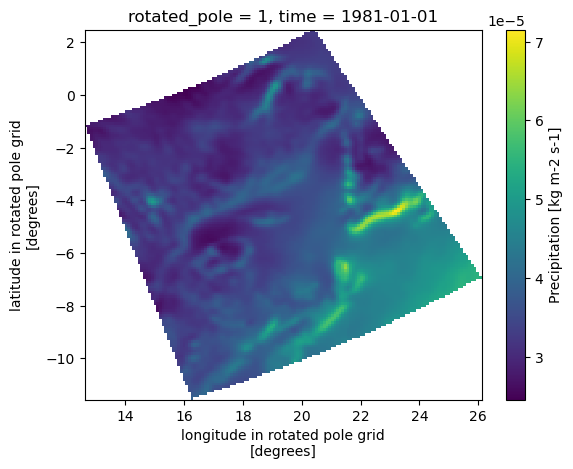
Note that the graphic axes follow the dimensions of the dataset, namely rotated longitudes and latitudes. The bounding box subset is however performed on longitudes and latitudes, and the areas outside of the bounding box are filled with NaNs, which explain the presence of white areas in the graph.
In this second example, we’ll use xclim to compute the heat index’ annual maxima at the selected site. The heat index accounts for both temperature and relative humidity to describe human perception of heat.
# NBVAL_IGNORE_OUTPUT

from xclim import convert

# Compute heat index using xclim and find the annual maxima.
with Client(**dask_kwargs) as c:
    clear_output()
    display(c)
    hi_max = convert.heat_index(ds=site).resample(time="Y").max()
clear_output()

# Plot the results
hi_max.plot()
[<matplotlib.lines.Line2D at 0x7f1c9b235220>]
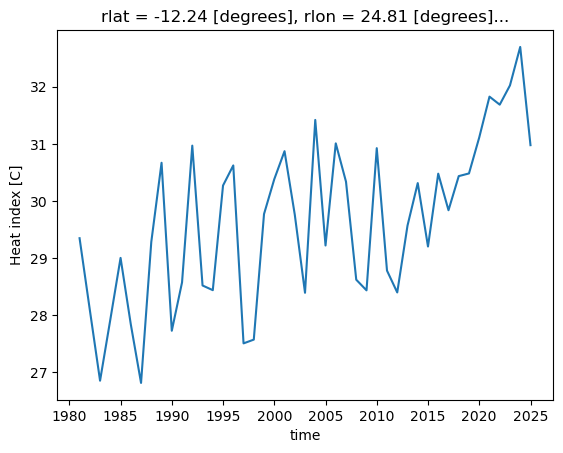
Visualization
Finally, we show how plot the CaSR data on a map. We need to specify two projections: one for the map, and another for the data. The Cartopy library is then able to connect data coordinates to map coordinates.
Here for simplicity we’ll use the regular lat-lon projection, called PlateCarree. Other choices would be Orthographic for a remote sensing view of the Earth, or LambertConformal, a projection often used for Canada-wide maps.
The details of the data coordinate reference system are stored for convenience within the rotated_pole variable’ attributes.
bbox.rotated_pole
<xarray.DataArray 'rotated_pole' ()> Size: 4B
array(1, dtype=int32)
Coordinates:
    rotated_pole  int32 4B 1
Attributes:
    north_pole_grid_longitude:  0.0
    grid_north_pole_latitude:   31.758312454493154
    grid_north_pole_longitude:  87.59703130293302
    earth_radius:               6370997.0
grid_mapping_name: rotated_latitude_longitude- 1
array(1, dtype=int32)
- rotated_pole()int321
- north_pole_grid_longitude :
- 0.0
- grid_north_pole_latitude :
- 31.758312454493154
- grid_north_pole_longitude :
- 87.59703130293302
- earth_radius :
- 6370997.0
- grid_mapping_name :
- rotated_latitude_longitude
array(1, dtype=int32)
- north_pole_grid_longitude :
- 0.0
- grid_north_pole_latitude :
- 31.758312454493154
- grid_north_pole_longitude :
- 87.59703130293302
- earth_radius :
- 6370997.0
- grid_mapping_name :
- rotated_latitude_longitude
import cartopy.crs as ccrs

# A regular lat-lon projection for the map
pc = ccrs.PlateCarree()

# The coordinate reference system for the rotated pole data
rotp = ccrs.RotatedPole(
    pole_longitude=bbox.rotated_pole.grid_north_pole_longitude,
    pole_latitude=bbox.rotated_pole.grid_north_pole_latitude,
)

# Plot rotated pole data on a regular lat lon grid.
fig = plt.figure(figsize=(4, 4))

# Here we specify the map projection
ax = plt.subplot(1, 1, 1, projection=pc)
ax.set_extent(lon_bnds + lat_bnds)

# Here we specify the transformation required to map data coordinates to map coordinates.
m = ax.pcolormesh(pr10y.rlon, pr10y.rlat, pr10y, transform=rotp)

# Fine-tuning
ax.coastlines()
ax.gridlines()
plt.colorbar(
    m,
    orientation="horizontal",
    label=f"{pr10y.long_name} ({pr10y.units})",
    fraction=0.046,
    pad=0.04,
)
<matplotlib.colorbar.Colorbar at 0x7f1c9aebd4f0>